
LiveReacting and StreamNeo can both send pre-recorded video to a live destination, but that overlap hides a more useful distinction.LiveReacting is a production studio built around interactive broadcasts.StreamNeo is an operations tool built around keeping a pre-recorded channel running.
That difference matters more than a long feature checklist.A marketer launching a product for two hours needs audience participation, scene changes and a countdown.A creator running a lofi, devotional or study channel every minute of the month needs a dependable loop and predictable slot pricing.
Disclosure: StreamNeo is our product.LiveReacting facts and prices below come from its public pricing and help pages checked on 26 July 2026.Competitor plans change, so confirm the checkout total before buying.
Interactive events vs always-on channels
The shortest way to frame LiveReacting vs StreamNeo is “produce” versus “run.” LiveReacting gives you a canvas for assembling a show: put a recorded video into a scene, add a poll or countdown, bring in guests, display comments and react while the stream is live.StreamNeo asks for a video or playlist, a destination and a stream key, then handles the continuous broadcast.
This is not an absolute divide.LiveReacting now sells a dedicated 24/7 plan, and StreamNeo lets you update a playlist.The distinction is product emphasis.LiveReacting’s studio is useful when the composition of the show changes; StreamNeo removes controls that an always-on loop does not need.
Start with the verb in your brief.If the team says “produce a launch,” the interactive studio is likely the stronger fit.If the goal is “run this channel all month,” evaluate the service as infrastructure: loop duration, recovery, playlist changes, concurrent slots and monthly cost.

LiveReacting’s feature set honestly
LiveReacting deserves full credit for interaction.Its official pre-recorded streaming page lists customizable layouts, multistreaming, automated scene changes, displayed comments, webcam video and real-time editing.You can pause or reposition a recorded video and switch scenes while the broadcast is running.
The engagement layer is the real differentiator.LiveReacting supports comment-driven polls, trivia games, giveaways and countdowns.It also provides ready-to-use templates, so a campaign team can build a branded experience without recreating each element in editing software.
That makes it genuinely better for several jobs:
- Product launches: run a countdown, play a polished recording, then switch to a live Q&A or giveaway.
- Contest and trivia streams: collect answers from comments and show changing results on screen.
- Agency campaigns: reuse templates while changing branding, scenes and destinations for each client.
- Scheduled replays with a live host: play the main segment from a file while a presenter manages chat and transitions.
It is also a credible pre-recorded live stream tool.LiveReacting can upload a file, schedule it, build a video playlist and loop that playlist.Its playlist documentation shows a “Play in loop” option that returns to the first video after the last one ends.
StreamNeo does not try to match those production features.It does not add native polls, games, lower thirds or countdown widgets over a running loop.If a graphic must remain on screen, render it into the source video before upload.That is a limitation for campaigns, but often a welcome simplification for channels whose program is already edited.
How each one prices
As of July 2026, LiveReacting’s public pricing is subscription-based; it does not use hourly credits.Its regular plans allow unlimited stream count per month but cap the duration of each individual stream.The dedicated 24/7 plan changes that duration rule and includes one concurrent always-on stream.
| LiveReacting plan | Month-to-month | Annual-billing equivalent | Maximum duration per stream |
|---|---|---|---|
| Free | $0 | — | 30 minutes; 3 streams per month |
| Small | $19.99 | $16/month, billed $192/year | 1 hour |
| Medium | $39.99 | $33/month, billed $396/year | 3 hours |
| Large | $99.99 | $83/month, billed $996/year | 8 hours |
| Enterprise | $249.99 | $208/month, billed $2,496/year | 24 hours |
| 24/7 streaming | $39.99 | $33/month, billed $396/year | Unlimited; 1 concurrent stream |
Those are the base 30 FPS prices shown on the official LiveReacting pricing page.Optional 60 FPS or 4K upgrades can change the bill.The destination platform may impose its own broadcast limit even when the LiveReacting plan says unlimited.
StreamNeo has a simpler per-slot menu: ₹49 for a day, ₹999 for a month in India, or $9.99 per month for international customers.Its current pricing includes a 24-hour trial with no card.The monthly plan is the relevant one for an always-on channel; the daily plan is more useful for a festival, event or short proof-of-concept.
Do not compare the $19.99 LiveReacting Small plan with StreamNeo’s $9.99 plan and conclude that they cover the same job.Small stops each stream after one hour.For nonstop service, the fair comparison is LiveReacting’s 24/7 plan against a StreamNeo monthly slot.
Limits that decide it
The main limit is not how many times you can press “Go Live.” It is how long one broadcast is allowed to stay active.LiveReacting’s free and event plans range from 30 minutes to 24 hours per stream.Looping a video does not remove that plan cap; its own FAQ says a file can loop only within the maximum duration of the subscription.
LiveReacting’s dedicated 24/7 plan is the exception: one concurrent stream with unlimited duration.This is the right LiveReacting option to price for a permanent YouTube channel.Choosing Enterprise just because it reaches 24 hours would still require arranging a new broadcast at each boundary.
StreamNeo uses an endless loop as the default job rather than as a plan exception.You upload through the dashboard, open Streams, select a slot, paste your YouTube stream key — the one destination it publishes to — and assign the video or playlist.Once started, the slot keeps publishing without your laptop or phone staying on.
The trade-off returns on overlays.LiveReacting can place polls, comments, timers, logos and game layers over the video, while StreamNeo expects the uploaded program to look final.For a daily news rundown or sale reveal, being able to edit layers live can be decisive.For a bhajan loop that should look the same at 3 p.m.and 3 a.m., those controls may add no value.
Also check concurrency rather than only duration.LiveReacting’s advertised 24/7 price covers one concurrent stream, with more streams available as an upgrade.StreamNeo pricing is likewise slot-based.If you need three channels at once, calculate three active slots and confirm the live checkout on either service.
Total cost for one month of 24/7
Use one clear scenario: one pre-recorded channel, one destination, running continuously for a 30-day month, at the providers’ base advertised settings.Exclude tax, foreign-exchange spread and optional upgrades.No hourly multiplication is needed because both relevant products sell subscriptions.
| Option | Billing commitment | Advertised cost for the scenario |
|---|---|---|
| LiveReacting 24/7 | Month-to-month | $39.99 for the month |
| LiveReacting 24/7 | Annual billing | $396 upfront for the year; $33 monthly equivalent |
| StreamNeo international | Monthly | $9.99 for the month |
| StreamNeo India | Monthly | ₹999 for the month |
| StreamNeo India daily plan | 30 separate days | ₹49 × 30 = ₹1,470 |
For an international month-to-month buyer, compare LiveReacting’s $39.99 with StreamNeo’s $9.99 for one slot.Against LiveReacting’s $33 annual-billing equivalent the gap is smaller, but that rate requires paying for the whole year up front.For an Indian buyer, keep the comparison in original currencies: the final LiveReacting rupee amount depends on the card network’s exchange rate, taxes and any international transaction charge.
The ₹49 daily option also shows why duration matters.It is cheaper than ₹999 for a short run of up to 16 days; at 17 days, ₹49 × 17 is ₹833, so the monthly plan becomes cheaper.That calculation assumes one slot and no gap between daily purchases.
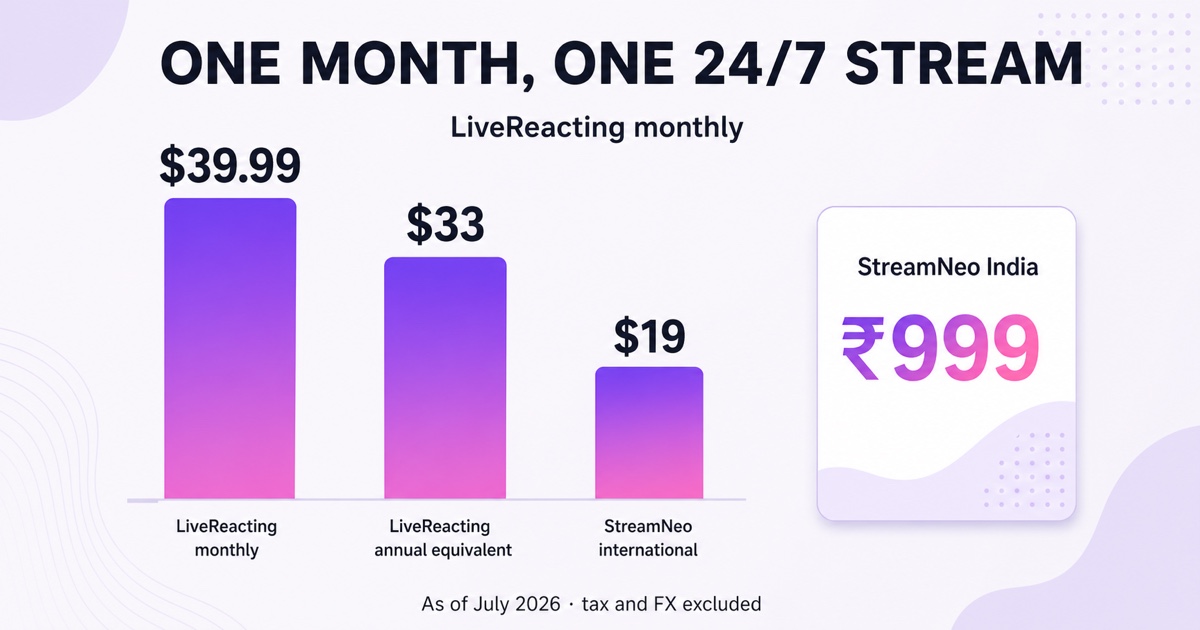
Chart assumptions: one 24/7 stream, base advertised plans, July 2026 pricing, before tax, exchange charges and optional upgrades.The ₹999 India price is shown separately because a rupee bar should not be scaled against dollar bars without choosing a live exchange rate.
Pick-one guidance
Choose LiveReacting when audience interaction is part of the program itself.A launch countdown, comment-powered poll, contest, trivia show, branded scene sequence or hosted replay benefits from its studio.Paying more can be rational when those elements save the team from building a custom production stack.
Choose StreamNeo when the file is already the finished show and the job is to keep it running.That includes lofi mixes, meditation sessions, study loops, devotional programming, owned podcast replays and evergreen product demonstrations.The smaller feature surface, India pricing and phone-friendly dashboard fit a creator who wants to check a slot rather than operate a studio.
An agency may need both.Produce finite campaign streams in LiveReacting, then use a loop service for the client’s persistent channel between launches.This is the same category distinction explained in our guide to Restream versus 24/7 loop services.For a broader shortlist, see the best 24/7 pre-recorded streaming services.
The decision is simple once you stop asking which tool has more features.Ask whether you are producing a changing event or operating a finished channel.Then price the plan that can actually cover that duration.
Start free — 24-hour trial, no card.
More from the journal: GoLiveIndia vs StreamNeo: An Honest India-to-India Comparison · Gyre vs StreamNeo in 2026: Refreshed Comparison · Castr 24/7 Limits Explained: File Caps, Storage and Pre-Recorded Streams
FAQ
Does LiveReacting charge per hour?
No.As of July 2026, LiveReacting’s public plans are monthly subscriptions, not hourly credit packs.Most plans limit the duration of each stream, which can look like hourly pricing at first glance.Its dedicated 24/7 plan instead provides unlimited duration for one concurrent stream.
Which handles a nonstop stream cheaper?
For one base always-on slot, StreamNeo lists $9.99 per month internationally or ₹999 per month in India.LiveReacting lists its 24/7 plan at $39.99 month-to-month or $33 per month when $396 is billed annually.Taxes, upgrades, extra slots and currency conversion can change the checkout total.
Can I add polls to a StreamNeo loop?
Not as a native interactive layer.StreamNeo’s job is continuous playback, not comment-driven production.You can bake a static question, timer or branded graphic into the source video, but a poll whose result changes from live comments requires an interactive tool such as LiveReacting.