
StreamNeo update — 19 September 2026: Every slot streams whatever you upload — any quality, up to 4K 60fps — at one price per billing term, so the prices below are the whole story. The 24-hour trial includes one YouTube stream, your videos in their original quality, and 10 GB of storage. See current plans.
The price beside a OneStream Live plan is not necessarily the price of a nonstop channel.A plan buys a bundle of scheduled-streaming, studio, storage, team and destination features; continuous YouTube streaming is either a separate add-on or an Enterprise inclusion.
That distinction changes the budget.For one pre-recorded video running on YouTube around the clock, the cheapest month-to-month OneStream configuration is currently $45, not $15 and not free.Here is the complete arithmetic, using OneStream’s public USD prices and official help documentation checked on 26 July 2026.
How OneStream’s pricing architecture works
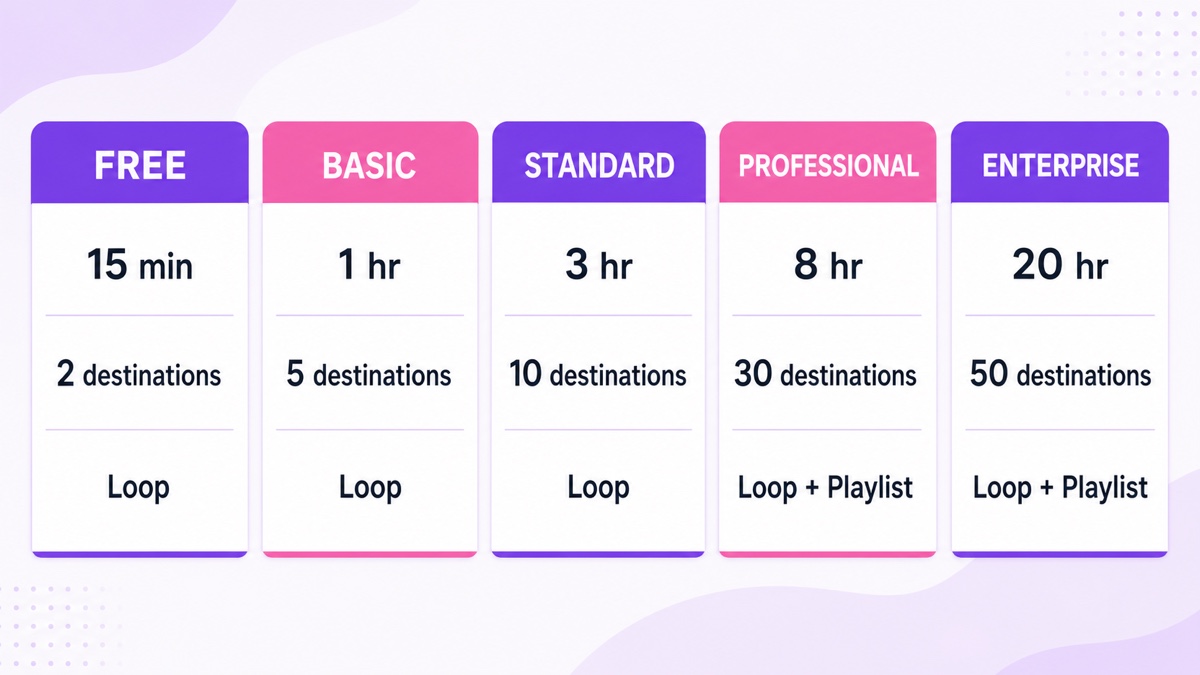
OneStream Live sells five plans: Free, Basic, Standard, Professional and Enterprise.Moving up the ladder increases the normal pre-recorded stream duration, resolution, storage, social-destination allowance, team seats and live-studio capacity.Some capabilities appear only at higher levels: for example, the current OneStream pricing page lists playlist streaming on Professional and Enterprise.
There are also two different meanings of “loop”:
- Regular looping repeats a pre-recorded video inside the plan’s maximum duration.A ten-minute clip on Basic can repeat six times, but the event still reaches Basic’s one-hour ceiling.OneStream’s looping documentation says the repeat count depends on both video length and subscription plan.
- Dedicated 24/7 streaming is a separate YouTube workflow.Basic, Standard and Professional can add one indefinite-stream slot for $30 per month; Enterprise includes three concurrent 24/7 streams.
Destinations follow the same bundle-plus-extras model.Each paid plan includes a fixed allowance, from five on Basic to 50 on Enterprise.Extra destinations are sold in packs—the public page starts with five more for $10 per month—rather than charging for every broadcast minute.A single 24/7 YouTube channel does not need that destination add-on.
The OneStream Live plan table
This table uses OneStream’s public USD catalog and its official plan guide, checked on 26 July 2026.“Annual equivalent” divides the published annual invoice by 12; it is not a month-to-month option.
| Plan | Monthly | Annual billing | Max regular pre-recorded stream | Included destinations | Loop and playlist | Dedicated 24/7 |
|---|---|---|---|---|---|---|
| Free | $0 | $0 | 15 minutes | 2 | Loop; no playlist | Not included |
| Basic | $15 | $144/year ($12/month equivalent) | 1 hour | 5 | Loop; no playlist | $30/month add-on |
| Standard | $39 | $384/year ($32/month equivalent) | 3 hours | 10 | Loop; playlist not listed | $30/month add-on |
| Professional | $49 | $468/year ($39/month equivalent) | 8 hours | 30 | Loop and playlist | $30/month add-on |
| Enterprise | $99 | $996/year ($83/month equivalent) | 20 hours | 50 | Loop and playlist | 3 concurrent streams included |
The duration column is the easy one to misread.It governs ordinary pre-recorded events even when the video is set to loop.It does not describe how long the separate 24/7 mode can run.Basic also tops out at 720p, while Standard and above list 1080p; that matters if a full-HD output is non-negotiable.
Which OneStream plan can actually run 24/7?
Basic plus the 24/7 add-on is the cheapest configuration for one continuous YouTube loop. The Free plan permits short pre-recorded streams and looping, but it does not include or advertise access to the dedicated 24/7 feature.Standard and Professional also require the add-on; their higher prices buy surrounding capabilities, not a longer dedicated 24/7 run.
There is an operational limit behind that answer.OneStream’s 24/7 setup guide says the feature is available only for YouTube and one configured run can last a maximum of 30 days.The dashboard path is Create Stream → Pre-Recorded Feature → 24/7 Stream, followed by video selection, optimization, stream-duration choice, YouTube-channel selection and scheduling.
So “indefinite stream” describes the add-on category, not one unbounded event.A permanent channel needs another run prepared at each 30-day boundary.Do not assume a gapless handoff, identical watch page or automatic rollover from the pricing label alone; verify the exact transition with an unlisted channel before relying on it.
Without the add-on, the regular duration cap forces much shorter event cycles: hourly on Basic, every three hours on Standard, every eight hours on Professional or every 20 hours on Enterprise.OneStream does offer advanced tools such as recurring and consecutive scheduling on eligible paid plans, but stitching capped events together is a different workflow from the dedicated 24/7 mode.
Hidden arithmetic for one always-on channel
The clean month-to-month example
Define the job before comparing prices: one uploaded video, one YouTube channel, 30 days, running 24 hours a day.Use monthly billing, one operator, no website embed traffic and a file that fits the plan’s included storage.
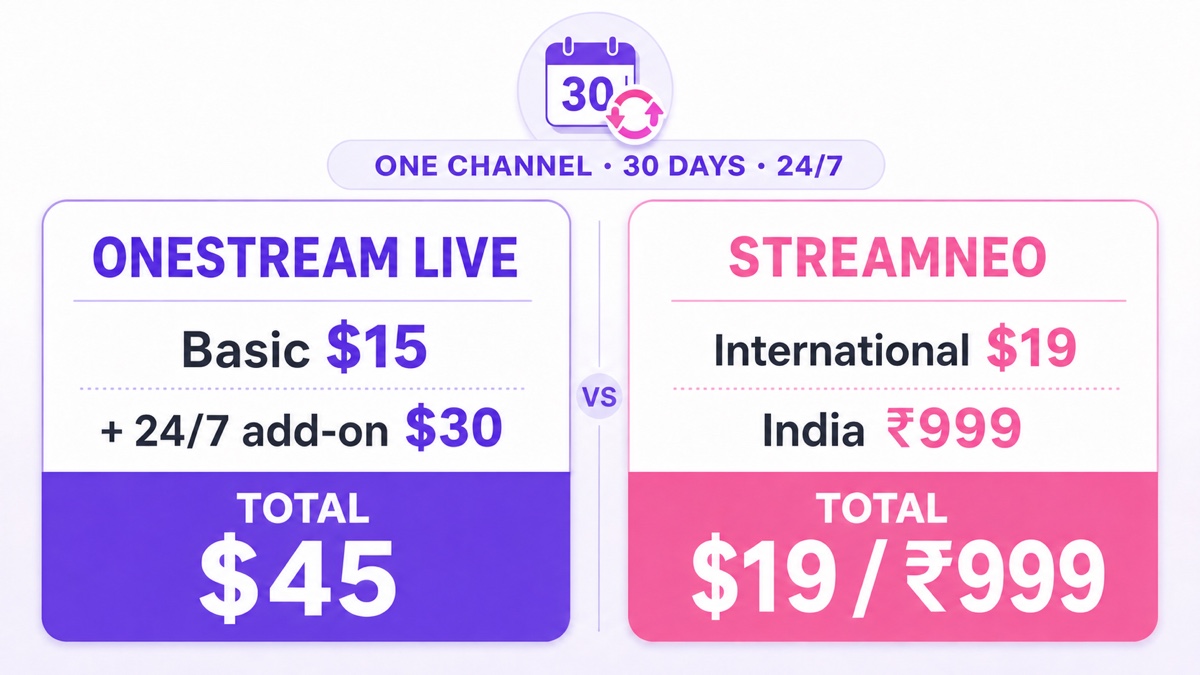
- Basic monthly plan: $15.
- One 24/7 stream add-on: $30.
- Extra destinations: $0; the job uses one YouTube destination.
- Extra team seats, storage and CDN bandwidth: $0 under the stated inputs.
- Total for the 30-day job: $45.
If you require 1080p, Basic’s 720p ceiling changes the cheapest practical base to Standard.The same calculation becomes $39 + $30 = $69 for the month.If you need a playlist rather than one repeated video, Professional is the first plan whose public feature list includes playlist streaming, making that configuration $49 + $30 = $79 monthly.
Annual billing and add-on cadence
OneStream advertises savings of up to 20% on annual base plans.Its published annual totals are $144 for Basic, $384 for Standard, $468 for Professional and $996 for Enterprise.Those invoices lower the base-plan equivalent, but they also commit the buyer for a year.
The add-on billing guide states that add-ons follow the main subscription’s monthly or yearly term: a yearly base plan cannot carry a monthly add-on.Because the public add-on card displays $30 per month but does not expose a separate annual add-on discount in the text, check the final yearly invoice in OneStream’s review screen instead of assuming the base-plan discount applies to the add-on.
Optional extras that can move the total
OneStream’s catalog lists extra storage from $10 per month for 10 GB, extra CDN bandwidth from $10 per month for 1 TB, and destination bundles from $10 per month for five.Team-seat bundles also cost extra.These do not belong in the one-channel worked example, but a production agency may need them.
Also keep the product boundary clear: the official dedicated 24/7 instructions specify YouTube.Buying more destinations does not prove that the same indefinite-mode job can simultaneously run to Facebook or another network.Compare the broader market in our 24/7 streaming services guide if multi-platform permanence is the requirement.
The flat-rate contrast for the same 30-day job
Disclosure: StreamNeo publishes this article and is our product.The comparison below keeps the input identical and does not assign a dollar value to OneStream’s broader studio, team or embed features.
| Service and configuration | One channel for 30 days, 24/7 | Run model |
|---|---|---|
| OneStream Basic + one 24/7 add-on | $45 on monthly billing | YouTube-only 24/7 mode; configure the next run at the 30-day maximum |
| StreamNeo international monthly slot | $9.99 | The loop continues while the slot is active, unless stopped or interrupted by the destination |
| StreamNeo India monthly slot | ₹999 | The same active-slot streaming model, billed in rupees |
| StreamNeo India daily slot for all 30 days | 30 × ₹49; compare the monthly quote | Useful for short campaigns; the ₹999 monthly plan is cheaper for a full month |
There is no honest same-currency India conversion to print for OneStream without choosing a live exchange rate and accounting for the buyer’s card charges, so the table leaves OneStream in its published USD and StreamNeo in its native regional prices.See StreamNeo’s current pricing before purchase, and use our direct OneStream Live vs StreamNeo comparison when features matter as much as the total.
Who should still pick OneStream Live?
The $45 result does not make OneStream a poor choice.It shows that you are buying a larger toolkit.OneStream is the stronger fit when these are real requirements:
- Scheduled multi-destination events: the paid plans include five to 50 social destinations, and regular live or pre-recorded productions can be distributed broadly.
- Team workflows: plans include increasing seat allowances, with admin and manager roles for people who create and manage scheduled events.
- A browser studio: guest capacity, recording and higher-tier production controls suit interviews, launches and webinars.
- Website playback: OneStream documents both a persistent Universal Embed Player and event-specific Unique Embed Players.
- Mixed programming: an agency that runs guest shows, scheduled replays and occasional 24/7 YouTube channels may prefer one broad account.
Pick by workload, not by the cheapest row.Test the exact resolution, file size, loop seam, 30-day rollover and destination you will use.For trial terms across the category, consult our 24/7 streaming free-trial comparison.
Start free — 24-hour trial, no card.
FAQ
Which OneStream plan can stream 24/7?
Basic is the cheapest eligible paid plan when paired with the $30-per-month 24/7 add-on, producing a $45 month-to-month total.Standard and Professional also need the add-on.Enterprise includes three concurrent 24/7 streams.OneStream’s official guide currently limits the dedicated feature to YouTube and 30 days per configured run.
Does OneStream have a free plan?
Yes.The Free plan is advertised as free forever with no credit card required.It includes two destinations, 720p output, looping and pre-recorded streaming, but each regular pre-recorded stream is capped at 15 minutes, playlist streaming is unavailable, and dedicated 24/7 streaming is not included.
What does a month of nonstop streaming cost on each tool?
For the defined job—one YouTube channel running one loop for 30 days—OneStream’s cheapest monthly setup is $45: $15 Basic plus the $30 add-on.StreamNeo costs $9.99 per month internationally or ₹999 per month in India.OneStream includes a wider production toolkit; StreamNeo directs the slot price at continuous looping.