Thirty finished recipe videos are more than an archive. Arranged carefully, they can become an always-open cooking channel where someone can discover a breakfast idea at 7 a.m., a snack at 5 p.m., or a dinner recipe after work.
The useful version is not a random playlist with a LIVE badge. A cooking channel live stream 24/7 needs clear rights, consistent files, mid-recipe orientation, and a path back to each full upload. Build those pieces first; continuous delivery comes last.
What a recipe loop is for
Recipe search and live discovery do different jobs. A viewer searching “paneer butter masala without cream” usually wants one focused video with a clear beginning, ingredients, and method. Keep publishing those searchable VODs. They remain the best landing pages for specific cooking questions.
The live loop serves a different viewing habit: grazing. Someone opens the stream without choosing one recipe, watches a useful step, stays for the next dish, or leaves it playing on a television while cooking. Its job is sustained brand presence, discovery across your catalog, and another doorway into your strongest uploads. It supplements the VOD channel; it does not replace it.
| Format | Viewer intent | Best job |
|---|---|---|
| Individual upload | “Show me this recipe” | Search, saves, shares, and a complete answer |
| 24/7 recipe loop | “Give me something useful to watch” | Grazing discovery and catalog exposure |
| Short clip | “Surprise me quickly” | Reach and a hook into a full recipe |
Start with 12–20 recipes that look and sound reasonably consistent, not every file you own. A two- to four-hour rotation is easier to inspect than a giant library. Remove weak intros, outdated offers, duplicate recipes, and any video that depends on a description link you no longer control. Then arrange the approved set as a looping playlist live stream.
Rights and copyright come before scheduling
Your camera recording and narration may be yours, but that does not automatically clear every element inside the edit. Audit background songs, stock footage, recipe photos, fonts, and borrowed clips separately. A track licensed for a personal social post may not cover commercial, continuous broadcasting. If the license is unclear, replace the asset rather than hoping a claim will not arrive.
Visible grocery packaging is a different question from a paid placement. A branded bottle appearing naturally while you demonstrate a recipe does not by itself mean the brand sponsored you. Do not imply an endorsement that does not exist. If a company paid you, financed the segment, or supplied something in exchange for coverage, disclose the relationship clearly.
YouTube says creators must tell the platform about paid product placements, sponsorships, endorsements, and other commercial relationships by selecting the paid-promotion declaration in the content details. On desktop, the documented path is YouTube Studio → Content → choose the item → More options → paid promotion checkbox → Save. You and the brand also remain responsible for applicable local disclosure rules; YouTube's label may not be your only obligation. Review the official paid-promotion guidance before publishing a sponsored rotation.
A safe catalog rule: if you cannot show where a song, graphic, or clip came from and what its license permits, keep it out of the 24/7 feed.
Design for the viewer who joins halfway through
A VOD viewer starts at zero. A live viewer may land while onions are already browning, with no idea whether the dish is poha, upma, or masala dosa. If the frame offers no context, even excellent cooking footage becomes wallpaper.
Use three persistent information zones. Put the recipe name in a compact top corner, the current action near the lower third, and a short ingredient card on the opposite side. “Masala dosa,” “Step 3 of 6: sauté onions,” and “Onion · oil · salt” answer the mid-join viewer's immediate questions without restarting the video.
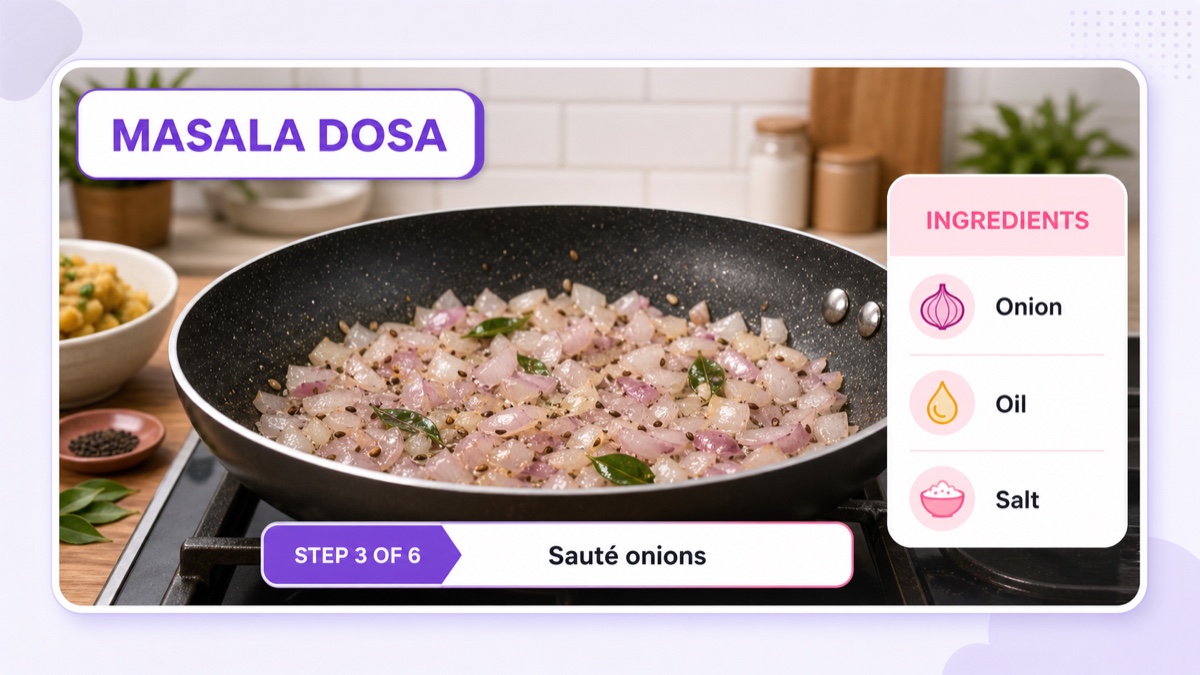
Keep overlays inside the safe center of the frame because television overscan, mobile controls, captions, and live-interface elements can cover edges. Use large type, strong contrast, and no more ingredient text than someone can read in a few seconds. Test a private or unlisted stream on an actual phone before launch.
Also make each recipe self-contained. Open with the finished dish, show the recipe name, then move into preparation. End with plating and a clear transition card before the next video. A viewer should be able to understand the current segment within ten seconds, even when joining in the middle.
Program by meal-time, with one honest limitation
Food viewing follows the day, so organize the rotation like a small television schedule: breakfast first, lunch and thali recipes next, snacks later, and dinner mains after that. A useful starter sequence is 45–60 minutes per block, mixing one quick dish, one deeper recipe, and one familiar favorite.
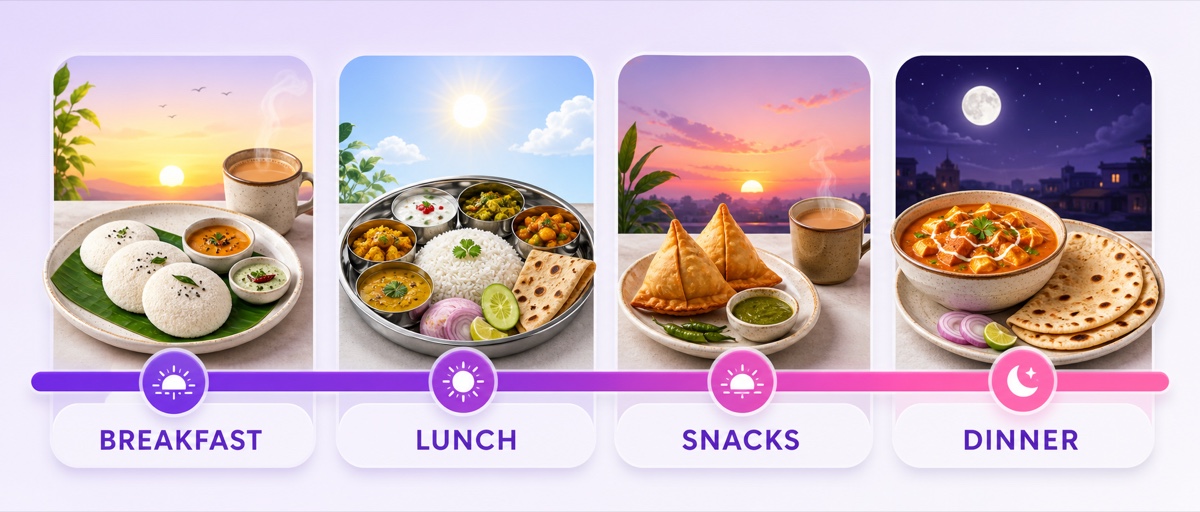
But a fixed loop does not know the clock. If a four-hour playlist repeats continuously, the breakfast block will eventually appear at lunch. You have two honest options: accept approximate dayparts and treat the labels as programming themes, or swap/schedule different rotations at set times. For exact timing, follow a deliberate uploaded-video live scheduling workflow rather than claiming the loop dynamically tracks meal time.
| Block | Good catalog choices | Mid-join cue |
|---|---|---|
| Breakfast | Idli, poha, dosa, eggs, chai | Prep time and current step |
| Lunch | Dal, rice, sabzi, regional thalis | Complete plate preview |
| Snacks | Chaat, pakora, sandwiches, tea snacks | Quick-result promise |
| Dinner | Curry, roti, pulao, one-pot meals | Serving count and sequence |
Depth beats a generic “all Indian food” feed. Forty well-organized Gujarati recipes, Tamil tiffin recipes, Bengali home meals, or budget hostel dishes give viewers a reason to remember the channel. Expand only after one cuisine or audience pattern earns repeat viewing.
Uniform exports prevent ugly seams
Older catalogs often mix portrait clips, 720p and 1080p exports, different frame rates, and wildly different audio levels. Those inconsistencies surface at every transition: black bars appear, sound jumps, or the next file takes too long to decode. Normalize the library once before building the final playlist.
Choose one house specification based on most of your usable footage. A practical default is MP4 with H.264 video and AAC audio, 1920×1080, 30 fps, and a constant frame rate. If most originals are genuinely 720p, keep a clean 1280×720 master instead of enlarging them and inventing detail. Use the same audio sample rate and channel layout across every export. The 24/7 video-format guide explains the container and codec choices in detail.
- Create a spreadsheet with filename, recipe, duration, resolution, frame rate, music source, and rights status.
- Re-export only the approved recipes to the house specification.
- Normalize speech and music so one clip does not force a volume change.
- Join three test files in sequence and inspect both transitions.
- Watch the test on mobile, television, and headphones before processing the entire catalog.
Do not hide vertical footage by stretching it. Place it inside a designed 16:9 frame with useful side cards—ingredients, step number, or serving notes—so the adaptation adds context.
Build a loop-to-VOD funnel
The stream should make full recipes easier to find, not trap them inside an endless feed. Add a small on-screen prompt at the end of each segment: “Full recipe: link in description.” In the live description, list every recipe in rotation with its VOD link. A pinned chat message can repeat that index and state the current rotation name.
Use stable recipe codes if the list is long: B01 for breakfast, L03 for lunch, and so on. Put the same code on the overlay and beside the link. A viewer who joins at “S04” can find the exact snack recipe without guessing which thumbnail matches.
Refresh the rotation weekly. Check which segments hold viewers, which VOD links receive attention, whether any sponsor disclosure is missing, and where people leave. Replace a few weak recipes rather than rebuilding everything. Update the description and pinned index at the same time, then keep a dated copy of the outgoing lineup.
StreamNeo is our product. Its role here is the delivery layer: take the finished, rights-cleared playlist and keep it streaming without leaving a kitchen laptop on. Once the replacement files are ready, make the weekly ritual a short phone task: open the stream, review the playlist, reorder or replace selected videos, save, and verify the live preview. The creative decisions still belong to you; the tool handles continuous playout.
Monetization should fit the viewing experience
If your channel is eligible and monetization is enabled, YouTube live streams can carry pre-roll and mid-roll ads, but an ad is not guaranteed for every viewer. The current setup path is YouTube Studio → Create → Go live → Edit → Monetization, where eligible creators can choose automatic or manual live ad settings. Check YouTube's live-stream monetization documentation because controls can change.
Cooking can tolerate an interruption better than a continuous sleep-sounds stream: viewers already expect cuts between prep, cooking, and plating. Even so, do not cram ad opportunities into crucial technique moments. Natural recipe boundaries protect the experience.
Sponsors, affiliate ingredients, cookware links, ebooks, and classes may also fit the niche, but none guarantees revenue. Keep paid segments useful, mark commercial relationships correctly, and measure whether the promotion sends qualified viewers somewhere meaningful. The stream's first job remains a good viewing experience.
If your recipe catalog is already waiting, use one controlled rotation to learn whether viewers want an always-open kitchen. Review StreamNeo pricing, then start the 24-hour free trial with no card and test the complete loop before making it public.
FAQ
Should recipes be a loop or uploads?
Use both. Individual uploads answer specific searches and give each recipe a permanent destination. The loop builds continuous presence and helps viewers discover several dishes in one session. Every loop segment should point back to its complete VOD.
How do mid-joining viewers follow along?
Keep the recipe name, current step, and a short ingredient card visible throughout the segment. Design those overlays for a small phone screen, keep them clear of player controls, and make each recipe understandable within a few seconds of joining.
Can I include brand products?
Yes, products can appear naturally in editorial cooking footage. If a brand paid, sponsored, or supplied something in exchange for coverage, use YouTube's paid-promotion declaration, disclose the relationship to viewers, and follow the laws that apply where you operate.