
If you already have a VPS, a finished video, and a YouTube stream key, you do not need a wrapper script to begin. You need one correctly ordered FFmpeg command. The order matters because several options apply only to the input that follows them.
The command below is the useful part. The rest of this guide explains where it fails, how to keep it alive, and what an apparently cheap DIY setup really asks you to operate.
The command that works
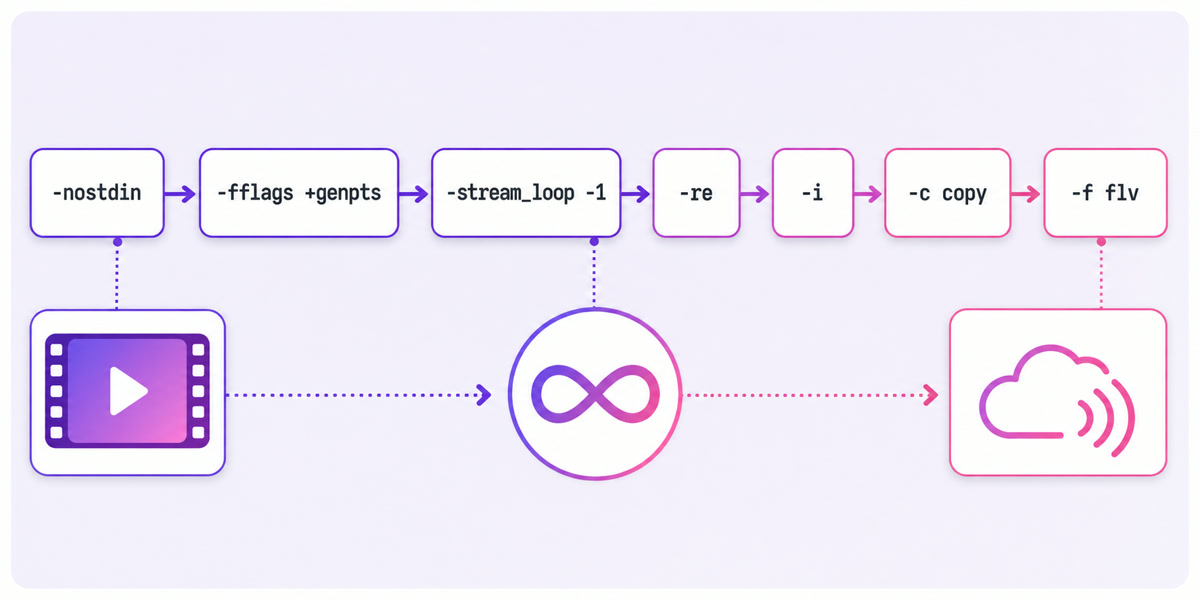
ffmpeg -nostdin -fflags +genpts -stream_loop -1 -re -i /srv/loop.mp4 -c copy -f flv rtmp://a.rtmp.youtube.com/live2/YOUR-STREAM-KEY
Replace the file path and placeholder key, then test against an unlisted YouTube broadcast before treating it as infrastructure. Keep the real key out of shell history and service files; the systemd example below loads it from a protected environment file.
-nostdinstops FFmpeg from reading interactive commands from standard input, which matters when the process runs detached.-fflags +genptsgenerates missing presentation timestamps when decode timestamps exist, helping the stream cross loop boundaries cleanly.-stream_loop -1repeats the input forever. It is an input option, so it must appear before-i.-rereads the file at its native rate instead of sending it as fast as storage permits.-i /srv/loop.mp4identifies the source file.-c copyremuxes the existing audio and video without encoding them again, keeping CPU use low.-f flvselects the FLV container used by this standard RTMP output.
The placement of -stream_loop -1 is the most important copy-paste detail. Put it after -i and it no longer configures that input. Also keep -re: without pacing, a local file can be read far faster than real time and the live destination is flooded with packets.
Why -fflags +genpts is not optional
A file has its own timestamp timeline. When an endless loop wraps from the final packet back to the first, weak or missing source timestamps can make the outgoing sequence jump backwards. Live muxers expect time to keep moving forward.
The symptom in your log looks like this:
Non-monotonous DTS in output stream 0:1; previous: …, current: …
One warning is not merely cosmetic when the destination is a continuous live ingest. Repeated timestamp disorder can produce audio drift, a visible freeze, or a push that YouTube eventually drops. +genpts tells FFmpeg to generate missing presentation timestamps from available decode timing, so keep it in this looping command rather than waiting for the warning to appear.
It cannot repair every badly authored source. If warnings continue, inspect and normalise the media instead of stacking random timestamp flags onto a production command.
Copy mode has one hard requirement
-c copy is efficient because FFmpeg does not decode and encode the streams. That also means it cannot change an incompatible codec. For this standard FLV/RTMP copy-mode path, prepare H.264 video with AAC or MP3 audio. HEVC, VP9, AV1 or Opus in the source can fail while the FLV header is being written.
Typical errors include Video codec hevc not compatible with flv and Could not write header for output file #0 (incorrect codec parameters ?). The container rule is the blocker; a file having an .mp4 extension does not guarantee that its streams are suitable.
Check before going live:
ffprobe -v error -show_entries stream=index,codec_type,codec_name,width,height,r_frame_rate,time_base -of default=noprint_wrappers=1 /srv/loop.mp4
If the codecs are wrong, convert the master once and loop the converted file:
ffmpeg -i original.mp4 -c:v libx264 -preset veryfast -profile:v high -pix_fmt yuv420p -b:v 4500k -maxrate 4500k -bufsize 9000k -g 60 -keyint_min 60 -sc_threshold 0 -c:a aac -b:a 128k -ar 44100 -f flv /srv/loop-ready.flv
At 30 fps, -g 60 creates a two-second keyframe interval, matching YouTube’s recommendation. For another frame rate, set the GOP to roughly twice that rate rather than copying 60 blindly. This one-time conversion costs CPU once; re-encoding on every 24/7 push pays that cost continuously. The deeper format checklist is in our guide to H.264 and AAC for continuous streaming.
Playlists: the concat demuxer and its sharp edge
For multiple videos, make a plain-text list.txt:
file '/srv/videos/part1.mp4'
file '/srv/videos/part2.mp4'
file '/srv/videos/part3.mp4'
Then loop the virtual concatenated input:
ffmpeg -re -f concat -safe 0 -stream_loop -1 -i list.txt -c copy -f flv rtmp://a.rtmp.youtube.com/live2/YOUR-STREAM-KEY
-safe 0 permits the absolute paths shown above. It also means the list file should be controlled by you, not populated from untrusted input.
Copy-concat is strict: every file needs the same codecs, stream layout, resolution, frame rate and timebase. A 1080p30 H.264/AAC clip followed by 720p25 media is not a harmless variation. Mismatches can cause frozen frames, audio drift, broken transitions or an immediate failure. Normalise the whole playlist to one specification before streaming.
Two problems the command cannot solve
There is no audio track
A silent video file is different from a video containing a silent audio track. Some live destinations expect an audio stream, and a reusable multi-platform master should include one. Add generated stereo silence while copying the video:
ffmpeg -nostdin -fflags +genpts -stream_loop -1 -re -i /srv/loop.mp4 -f lavfi -i anullsrc=channel_layout=stereo:sample_rate=44100 -map 0:v -map 1:a -c:v copy -c:a aac -b:a 128k -f flv rtmp://a.rtmp.youtube.com/live2/YOUR-STREAM-KEY
The explicit -map options select video from the file and audio from the generated source. If your file already has AAC audio, stay with the simpler copy command.
There is no RTMP output reconnect
FFmpeg’s -reconnect* flags belong to supported network inputs such as HTTP. Adding them to this RTMP output does not turn it into an auto-restarting publisher. When the write fails with av_interleaved_write_frame(): Broken pipe or Connection reset by peer, the basic FFmpeg process exits and the live push ends.
A network flap, server-side disconnect, expired key and rejected publish are different incidents. The one-line command does not classify them, delay retries intelligently, or notify you. That operational gap is why a 24/7 stream needs a supervisor.
So you write a supervisor
On a Linux VPS, systemd is the smallest reasonable first layer. Store the key in /etc/youtube-loop.env, set the file to mode 600, and put only this placeholder-shaped line inside it: YOUTUBE_STREAM_KEY=replace-me.
A minimal unit at /etc/systemd/system/youtube-loop.service looks like this:
[Unit]
Description=YouTube 24/7 video loop
Wants=network-online.target
After=network-online.target

[Service]
Type=simple
EnvironmentFile=/etc/youtube-loop.env
ExecStart=/usr/bin/ffmpeg -nostdin -fflags +genpts -stream_loop -1 -re -i /srv/loop.mp4 -c copy -f flv rtmp://a.rtmp.youtube.com/live2/${YOUTUBE_STREAM_KEY}
Restart=always
RestartSec=5

[Install]
WantedBy=multi-user.target
Create the key file with sudo install -m 600 /dev/null /etc/youtube-loop.env, edit it with sudoedit, then run sudo systemctl daemon-reload, sudo systemctl enable --now youtube-loop, and journalctl -u youtube-loop -f. Confirm the FFmpeg path with command -v ffmpeg; it is not always /usr/bin/ffmpeg.
| Event | What this unit does | What a real supervisor still needs |
|---|---|---|
| Process crash | Restarts after five seconds | Retry limits, backoff and an alert |
| Fatal auth error | Restarts the same rejected command | Detect “Publish Rejected,” stop the loop and notify you |
| Disk full | Does not diagnose the cause | Disk checks and log-retention controls |
| Server reboot | Starts again if the unit is enabled | Verify ingest recovery, not merely process existence |
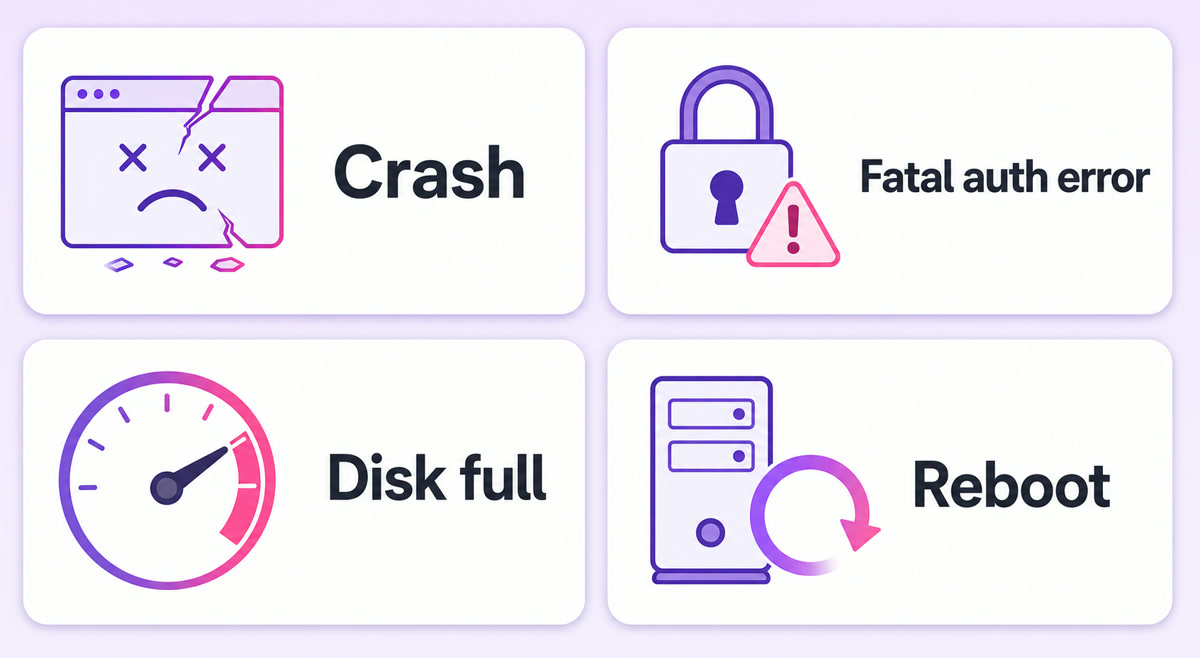
A fixed five-second restart is not backoff, and a running PID is not proof that viewers are receiving video. A useful monitor checks process state, recent progress, RTMP acceptance and YouTube stream health, then sends an alert through a channel you actually notice. Our auto-restart engineering guide covers that recovery ladder.
Disclosure: this is StreamNeo’s blog. StreamNeo is a managed version of this operational layer: the publisher, supervision, backoff, fatal-error handling and alerts are run for you rather than assembled on your VPS.
The DIY bill, itemised honestly
The VPS sticker price is only the first row. At a 4,500 kbps video bitrate, the transfer calculation is:
4,500,000 bits/second × 3,600 seconds ÷ 8 ≈ 2.025 GB/hour2.025 GB/hour × 24 × 30 ≈ 1,458 GB/month
That is about 1.4 TB per 30-day month before audio and protocol overhead. Rescale the formula with your actual total bitrate. A 128 kbps audio track, RTMP overhead and retries add traffic, so do not buy a plan whose allowance equals the bare video estimate.
| Cost | What to check |
|---|---|
| VPS | Monthly instance price, CPU availability and included outbound transfer |
| Egress | Allowance above roughly 1.4 TB at 4,500 kbps, plus the provider’s overage rate |
| Storage | Master files, normalised copies, playlist growth and logs |
| Operations | Monitoring, log reading, security updates, key rotations and reboot testing |
| Failure discovery | Whether an alert reaches you before a viewer’s comment does |
Use your provider’s current calculator rather than a made-up universal VPS price. Then compare the full monthly total and your on-call time with the VPS versus managed-service cost model, our broader 24/7 streaming cost breakdown, and the current managed-service pricing.
When DIY is genuinely the right answer
Run FFmpeg yourself when you enjoy operating servers, already have monitoring and alerting, need an unusual filter graph, or can place the workload on infrastructure you maintain anyway. The command is transparent, scriptable and flexible. For a technical team, owning every layer can be a feature.
A managed option is usually the saner trade when you have one channel, work mainly from a phone, or do not want a bhajan, lofi or evergreen loop to make you the on-call engineer at 3 a.m. The deciding question is not “Can I run this command?” It is “Do I want responsibility for every failure after it starts?”
Start free — 24-hour trial, no card.
FAQ
Does FFmpeg loop a video forever?
Yes. Use -stream_loop -1 before the relevant -i input, because it is an input option. In a continuous RTMP command, keep -fflags +genpts as well so missing or weak presentation timestamps do not break the timeline when the file wraps back to its first packet.
Why does my FFmpeg stream stop after a few hours?
The usual pattern is an RTMP write failure followed by FFmpeg exiting. Search the service log for Broken pipe, Connection reset by peer or a publish rejection. The basic command has no RTMP output reconnect, so use a supervisor that restarts transient failures, stops on fatal authentication errors and alerts you.
Can I stream any MP4 with -c copy?
No. MP4 is a container, not a codec guarantee. For the standard FLV/RTMP copy workflow shown here, use H.264 video with AAC or MP3 audio. If ffprobe reports HEVC, VP9, AV1 or Opus, convert the source once to a compatible master instead of re-encoding it on every live push.