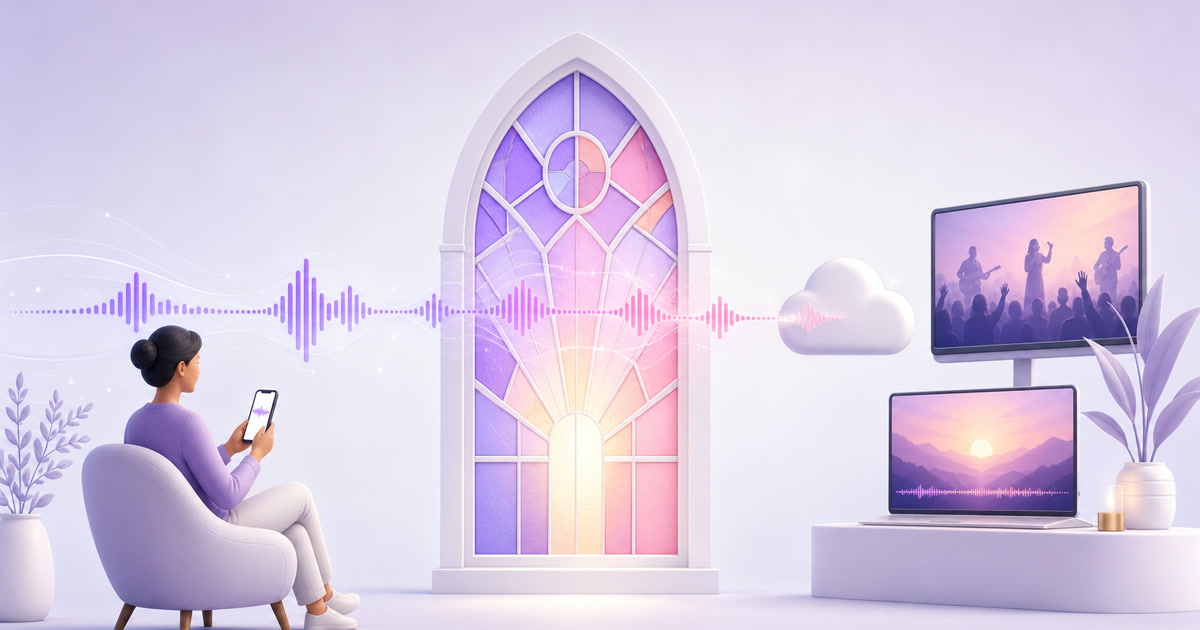
Sunday morning should not be the only time someone can enter the life of your church.A nurse finishing a night shift, a member recovering at home, or a family that moved to another city may all need a different hour.
An always-on channel can meet that need with material your church already creates: rights-cleared worship, sermons, and complete service replays.This church streaming without a tech team playbook keeps the operation small enough for one dependable volunteer—no OBS learning curve and no computer left running in the church office.
The always-open sanctuary
A worship music 24/7 stream is most useful when it feels like ministry, not automated filler.Think of it as an open door into the week: calm worship sets during weekday mornings, recent sermons in the afternoon, and the complete Sunday service at clearly announced replay times.
One recording can serve far beyond the room in which it was made.Shift workers can join after work, homebound members can remain connected, and former members can still hear a familiar pastor.The channel does not replace gathering, communion, pastoral care, or a phone call; it gives people another honest way to stay near them.
Start with a modest, repeatable library:
- Two or three complete service replays, with private announcements removed.
- Several worship blocks recorded by your own team and cleared for streaming under the applicable licence.
- Sermon-only segments for people who cannot watch a full service.
- A simple holding video with service times, a prayer-request link, and quiet audio you own.
Do not promise that a pastor is live when the programme is recorded.Use labels such as “Sunday service replay” and put the next in-person or genuinely live service time in the description.Trust matters more than the red LIVE badge.
Rights and copyright: what CCLI covers
This is the part to settle before you build the playlist.Permission to sing a song in an in-person religious service is not automatically permission to transmit that song online.The base Church Copyright Licence supports common congregational uses such as displaying or printing lyrics; streaming is a separate use.
CCLI currently offers two relevant products.Its Streaming Licence extends eligible Church Copyright Licence coverage to online worship services containing authorised songs performed by your church musicians.The Streaming Plus Licence extends coverage to authorised master recordings, backing tracks, and multitracks used during online services.CCLI also says the use of master recordings is generally audio-only; third-party music videos usually need separate permission.
A licence is not a universal music pass.Check the exact song, the type of recording, the way you will stream it, your country’s terms, and whether the stream will be monetised.
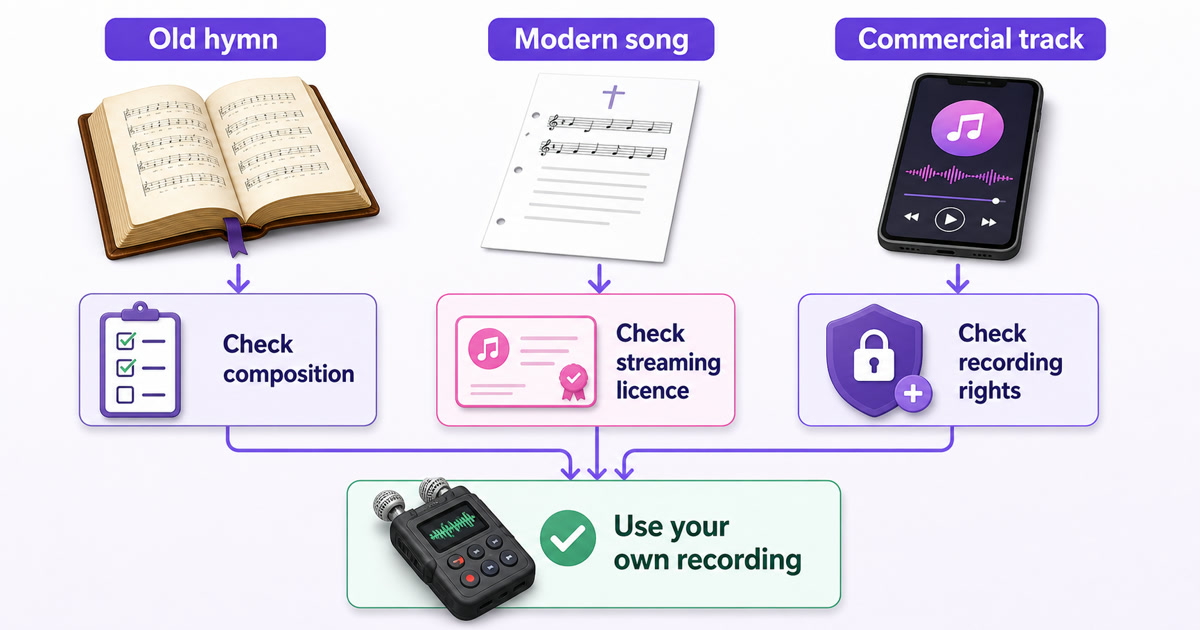
There are two works hiding inside most music: the composition (music and lyrics) and a particular sound recording.The U.S.Copyright Office explains that they are separate works, often with different owners.Your worship team may own its new recording, but that does not make a modern composition free to transmit.Conversely, a hymn’s composition may be public domain while a label’s recent recording or a publisher’s modern arrangement remains protected.
Age is only a starting clue.In the United States, the Copyright Office says works published before 1 January 1931 are currently in the public domain, but unpublished works, later arrangements, sound recordings, and rules in other countries can have different terms.An Indian church should check Indian rights and its regional CCLI terms rather than applying a U.S.date mechanically.
Use this pre-stream check for every item:
- Identify the composition. Search the current licensed catalogue or document why it is public domain in your territory.
- Identify the recording. Prefer a recording made by your congregation.If it is a commercial master, confirm that Streaming Plus or direct permission covers that exact use.
- Identify the programme. CCLI’s public guidance is framed around worship services and says archived service recordings may remain online while the licence is maintained.A song-only, continuous, monetised “radio” loop may fall outside that frame, so get written guidance from your regional licensing provider before running one.
- Keep evidence. Save the licence summary, song search result, permission emails, recording date, and contributor approvals in one folder.
A platform can still place an automated claim on licensed music.A licence gives you evidence to respond; it does not switch recognition systems off.Keep your documentation ready and read this guide to claims and copyright strikes before launch.This section is operational guidance, not legal advice; for uncertainty about a specific song or loop format, ask the relevant rights owner or licensing body.
Sermon and service permissions
The church may own its camera file, but people should still know how it will be used.Get the pastor’s approval for repeated online replay, tell the worship team that their performance will be broadcast, and agree on who can remove a segment.Put that understanding in a one-page media policy rather than relying on a hallway conversation.
Ask every guest speaker or visiting musician for a simple written yes.A useful line is: “I give [church name] permission to record, edit, stream, and replay my contribution to the [date] service on its official channels.” Let the guest add limits if needed, and retain the response with the episode notes.
Also mark privacy-sensitive moments while recording.Testimonies, prayer requests, children, counselling invitations, phone numbers on slides, and people who intentionally sit outside the camera area deserve care.When in doubt, trim the segment or use a wide shot that does not identify congregants.
The one-volunteer workflow
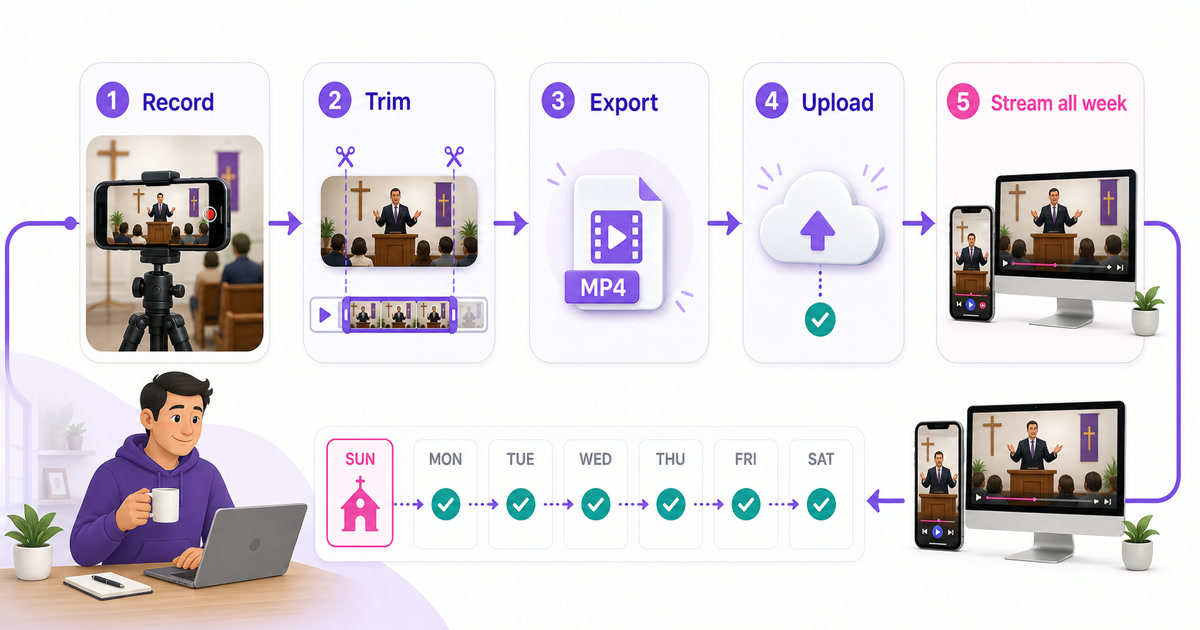
The simplest system has one hand-off each week.It should work even when the regular volunteer is away, so write the steps beside the church’s streaming login and keep recovery details with an authorised leader.
- Record on Sunday. Place a phone or camera on a stable tripod, frame a wide 1080p landscape shot, connect power, and enable Do Not Disturb.If possible, take a clean feed from the sound desk; otherwise test speech and music from the actual camera position before the room fills.
- Trim with restraint. Remove the empty start, private notices, long post-service movement, and any segment that lacks permission.Add a short title card saying “Service replay” and the original date.You do not need effects or cinematic transitions.
- Export one dependable file. MP4 with H.264 video and AAC audio is the practical default.Keep the original frame rate and confirm that speech stays in sync near the end.The 24/7 video format guide covers the settings in plain language.
- Upload and assign. In StreamNeo, go to Videos → Upload Video.Then open Streams, select the slot, paste the destination stream key, choose the new file, and start the stream.Use YouTube Studio → Create → Go live → Stream to obtain the YouTube key; never paste that key into a shared chat.
- Check the viewer side. Listen for one minute on a separate phone, confirm the title says replay, test the prayer link, and note the update in a small weekly log.
For the first setup, budget 45–90 minutes beyond the service recording while you learn the export and destination screens.Once the template is settled, a lightly trimmed weekly replay can take roughly 20–40 minutes of hands-on work, plus upload time.A multi-camera edit, captions, detailed colour work, or slow internet will take longer; call that a production choice, not a hidden “quick task.”
Facebook and YouTube together
Choose platforms by congregation habit.YouTube is strong for television viewing, searchable sermon archives, and a stable channel page.Facebook may be the familiar gathering place for older members, local groups, and relatives who already share church notices there.If your people use both, the volunteer should not have to run two computers.
Create the YouTube broadcast in YouTube Studio → Create → Go live → Stream.Create the Facebook destination in Facebook → Live video → Streaming software, then securely copy each destination’s stream details into the cloud workflow.Follow the complete YouTube and Facebook simulcast setup for the exact hand-off.
Do not treat Facebook as one endless session.Platform duration limits and reconnect behaviour mean a continuous church channel needs planned cycles and a clean restart routine.The pre-recorded Facebook Live guide explains that platform-specific reality.Keep the same pastoral description and replay disclosure on both destinations.
Growing the online congregation
Growth here means helping real people find care, not chasing a viral graph.Pin Sunday service times, the church address, accessibility details, and one prayer-request email or form.Put the same information in the video description and the channel’s About section so a first-time viewer does not have to hunt.
Treat chat like the foyer.Assign two lay moderators who can welcome people, answer practical questions, remove abuse, and move sensitive prayer needs into a private channel.Give them a short escalation list: pastoral emergency, safeguarding concern, personal data, and anything that should never remain public.
A healthy weekly rhythm is enough:
- Post the Sunday replay time after the service.
- Invite one clear response, such as a private prayer request or visit-plan form.
- Reply to genuine questions in the same language the viewer used where your team can do so faithfully.
- Review which sermon or service people actually watched, then improve titles and audio before adding more hours.
Never publish a prayer request, phone number, donation detail, or testimony as “engagement content” without explicit consent.An online congregation should feel as safely shepherded as the room.
Costs a church board understands
Present the decision as stewardship, not software excitement.A PC-based setup includes the machine, electricity, reliable internet, repairs, operating-system updates, and the volunteer time required to notice failures.A cloud loop still needs recording, upload, rights checks, and a weekly viewer test, but it removes the need to leave a local streaming computer running.
| Board question | Always-on church PC | Cloud loop service |
|---|---|---|
| What is paid monthly? | Power, internet, and a share of hardware or repair cost | Subscription and the internet already used for uploads |
| What needs weekly attention? | Encoding app, restarts, updates, temperature, and connection | New file, rights record, schedule, and viewer-side check |
| What happens after hours? | A local fault may need someone to visit | The stream runs away from the church PC; the destination still needs monitoring |
Use the board’s own figures: monthly service fee + expected volunteer minutes + any extra internet cost.Compare that with equipment cost spread over its useful life + electricity + repair allowance + monitoring hours.Do not give volunteer time a value of zero just because it is generously donated.
StreamNeo is listed at $9.99 per month for international churches and ₹999 per month for Indian congregations; confirm the current amount on the pricing page.The right test is small: prepare one rights-cleared service replay, write the five-step hand-off, and see whether another authorised volunteer can run it.
Start free with a 24-hour trial—no card, and use the day to prove the ministry workflow before asking the board for a recurring line item.
More from the journal: Cricket Season Loops: Highlights, Replays and What You May Not Touch · FAST Channels Explained for Creators: Linear TV Without a Broadcaster · Sponsored Lower-Thirds and Tickers on a 24/7 Loop Without Breaking Policy
FAQ
Do we need CCLI to stream worship music?
For modern songs in CCLI’s authorised catalogue, churches commonly need the base Church Copyright Licence plus the appropriate Streaming Licence; commercial tracks may require Streaming Plus or direct permission.Coverage differs by song, recording, territory, programme type, and monetisation, so verify the current catalogue and regional terms.Public-domain music still requires a check on the arrangement and the recording you use.
Can we loop last Sunday’s service?
You can replay a church-owned recording when the sermon, people, songs, recordings, and other media in it are cleared for that use.Get a written yes from guest speakers, keep your worship streaming licence active where required, remove private moments, and confirm with your licensing provider that continuous looping fits your regional terms.
YouTube or Facebook for a church?
Start where your congregation already watches.Choose YouTube for search, TV viewing, and an organised archive; choose Facebook when your local church community already gathers there.If both matter, use one documented simulcast setup and plan Facebook’s session cycles instead of giving a second volunteer another machine to manage.