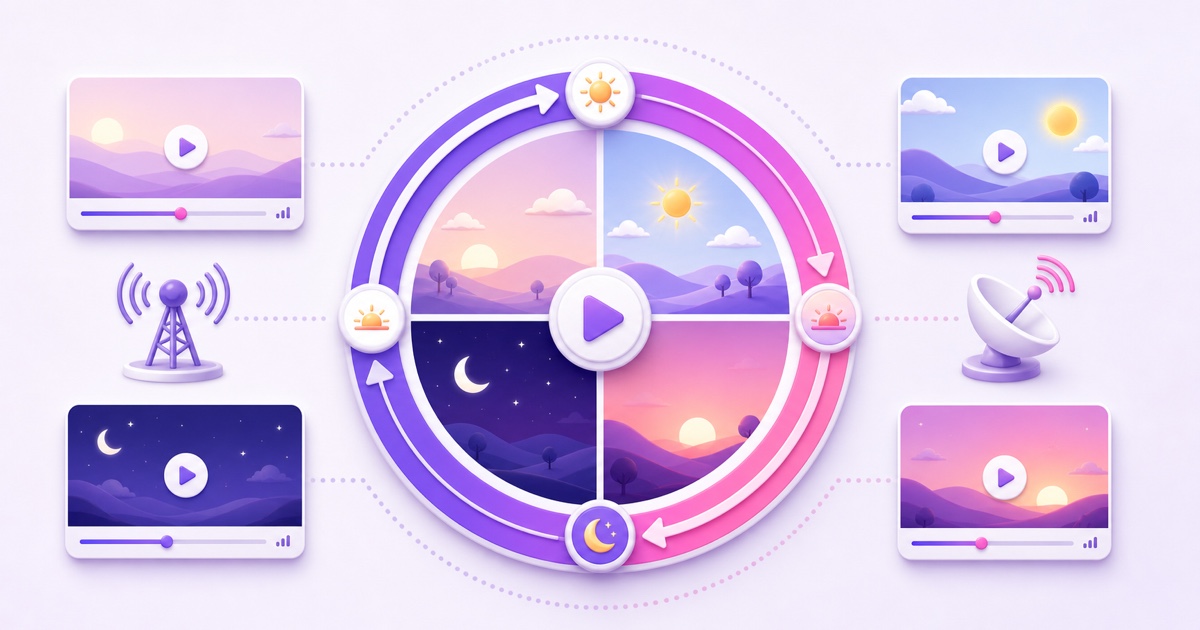
A live feed can run all day and still feel random. If the same file restarts whenever it ends, a viewer who visits at 7 a.m. has no reason to expect a different experience from someone arriving at midnight.
A useful 24/7 stream schedule fixes that experience. It gives each part of the day a recognizable mood, tells viewers when to return, and gives you a repeatable way to manage the channel. The aim is not to trick an algorithm. It is to make a clear programming promise and keep it.
Why programming beats pure looping
Pure looping answers one operational question: how do I keep a video playing? Programming answers the viewer's next question: what will be on when I come back?
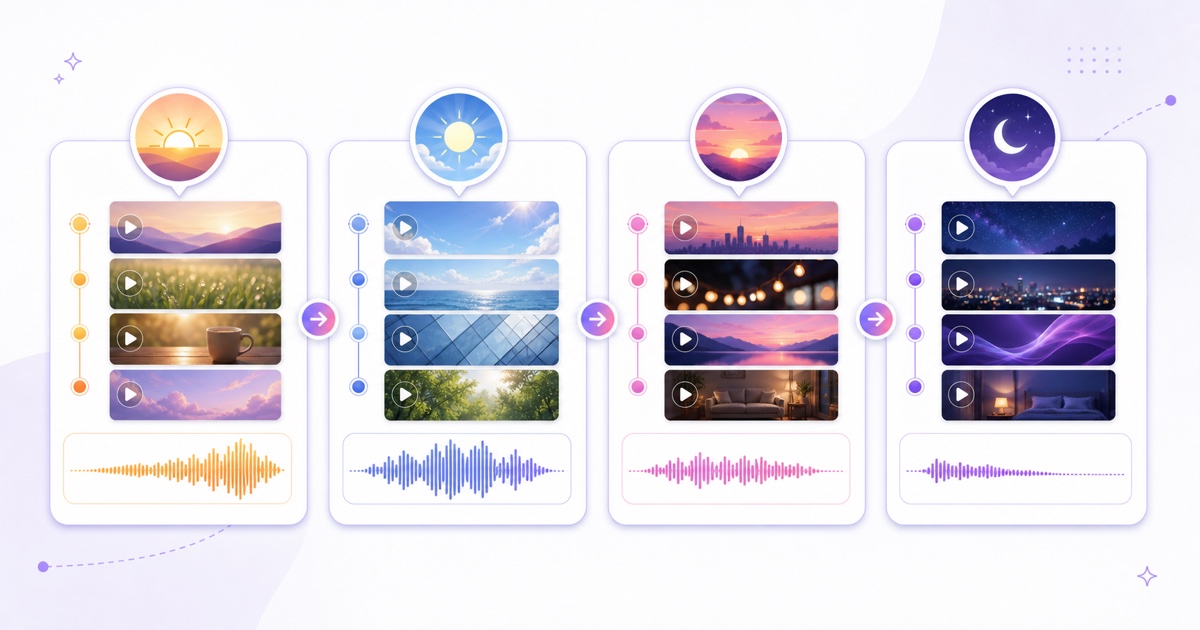
Think like a small radio station. A station may use recorded shows, but its morning block sounds different from its night block. A devotional channel might open with energetic morning aarti, move into a broad bhajan mix, feature a familiar evening selection, and become softer after bedtime. A focus channel can use the same structure with upbeat study sessions in the day and low-distraction ambience at night.
The advantage is habit, not guaranteed reach. A dependable slot lets a viewer decide, “I will open this stream during my morning routine.” That is more useful than claiming that a schedule automatically earns recommendations. YouTube evaluates many viewer and content signals; a clock by itself is not a growth switch.
Write one sentence that defines your station before touching the files. For example: “Calm devotional programming every day, with brighter mornings and quiet nights, in IST.” Every block should support that promise.
Design the programming wheel
Start with two to four dayparts. More blocks look impressive on paper but create more boundaries to maintain. A new channel should usually prove a simple day/night split before attempting an hour-by-hour grid.
- Choose one public time zone. If most viewers are in India, publish the schedule in IST. Do not make people convert from server time or UTC.
- Mark the natural moments in the audience's day. Morning routine, work or study hours, evening attention, and sleep are more useful anchors than arbitrary equal-sized blocks.
- Assign an energy level to each block. Decide whether the audio and visuals should feel bright, steady, focused, reflective, or sleep-friendly.
- Set only boundaries you can maintain. If you cannot reliably change content at 6:00 p.m., publish “evenings” instead of promising an exact minute.
| IST daypart | Programming role | Example content | Operational note |
|---|---|---|---|
| 6:00–9:00 a.m. | Clear, uplifting start | Aarti-led opening and brighter bhajans | Make this the easiest boundary to re-sync |
| 9:00 a.m.–6:00 p.m. | Steady daytime listening | Long bhajan mix with even audio levels | Use the longest, lowest-maintenance block |
| 6:00–9:00 p.m. | Familiar appointment slot | Evening chalisa or themed programme | Promote this block in the pinned comment |
| 9:00 p.m.–6:00 a.m. | Low-energy overnight bed | Soft instrumentals or quiet chants | Avoid abrupt loud openings at loop points |
This is a planning template, not a prescription. A lofi station could map those same rows to morning beats, deep-work instrumentals, evening jazzhop, and sleep ambience. Use only recordings and music you own or have permission to broadcast continuously.
Build it from files you already have
There are three workable ways to turn the wheel into a broadcast. Choose based on how exact your promise needs to be and how often you can supervise a boundary.
Method 1: render one exact 24-hour programmed day
Place every block on a single editing timeline that totals exactly 24 hours. Add short station IDs or neutral transitions between sections, export the file, and start it at the first advertised boundary. If playback begins at 6:00 a.m. IST and the file is truly 24 hours long, its next cycle begins at 6:00 a.m.
This method gives the strongest alignment with the least daily work. Its downsides are a very large file, slow revisions, and the need to re-export the whole day when one section changes. Confirm the final media duration with a media inspector rather than trusting the last timeline label. A few missing seconds still accumulate.
Method 2: order a playlist to mirror the dayparts
Create separate morning, daytime, evening, and night files, then place them in that order. For more detail on matching file formats and arranging multiple clips, use the looping playlist guide.
In StreamNeo, open Dashboard → Stream Slots → Configure Stream, select the platform, choose the videos, and use the up/down controls in the Playlist panel to set their order. Start the stream at the top of the programming day. While the slot is live, changing the selection exposes Update Playlist, so you can revise the running sequence without ending the broadcast first.
This is flexible, but the playlist follows media duration—not the wall clock. Four files named “morning,” “day,” “evening,” and “night” do not automatically jump to their named periods. Their combined duration and the time you started the sequence determine when each one plays.
Method 3: change content at the boundaries
Keep each daypart as its own file or playlist and switch at the advertised time. Prepare the next block before the boundary, set a phone reminder five minutes early, then update the live playlist. Follow the running-stream video change guide for the complete handoff.
This is the easiest way to hit exact wall-clock slots without rendering a full day, but it needs a person or a separately verified automation. A mid-stream update may produce a brief transition while the source push changes, so do not promise a literally frame-perfect cut.
Current capability note: StreamNeo provides ordered playlists and live playlist updates. Treat that playback as sequence-based. Do not assume it is a recurring, clock-aware daypart switcher; use an exact-duration programme or make the boundary change yourself.
A scheduled event on YouTube or Facebook is also a separate idea. It creates a dated watch-page appointment; it does not rearrange the source files inside a continuous loop. Use the platform scheduling guide when you want a waiting page for a special programme.
The drift problem, honestly
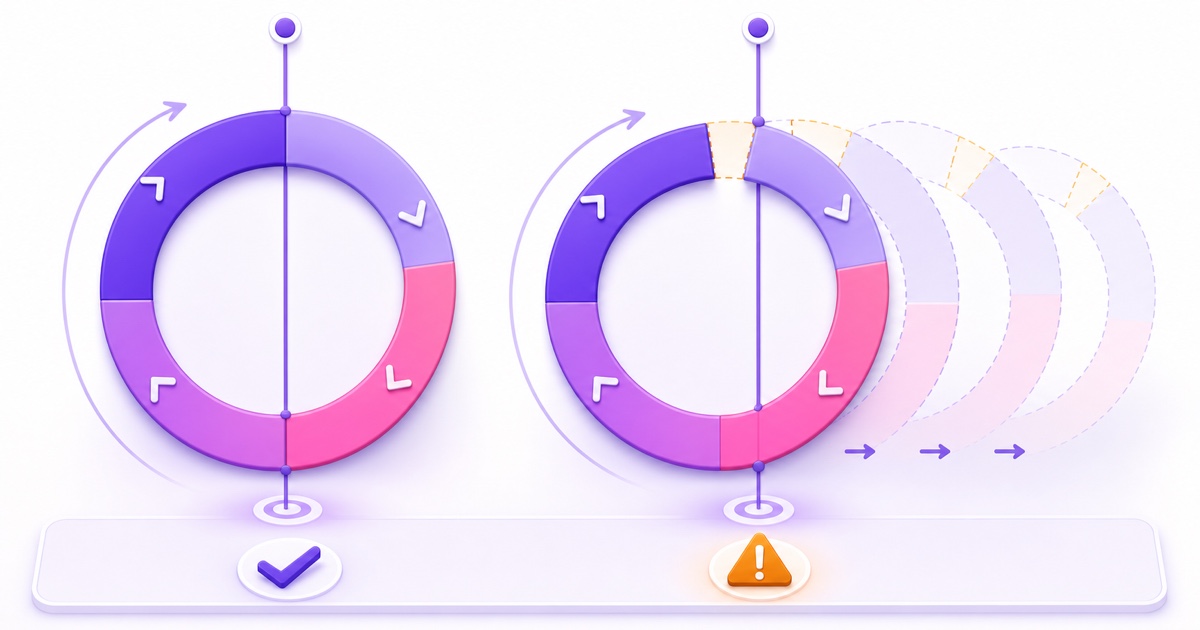
A loop measures elapsed media time. Your audience follows wall-clock time. Those two clocks stay aligned only when the full programme duration matches the intended cycle and playback is not reset at an unexpected point.
Suppose a “daily” file is 23 hours 30 minutes long and starts at 6:00 a.m. Monday. Its second cycle starts at 5:30 a.m. Tuesday, then 5:00 a.m. Wednesday. It moves 30 minutes earlier every day and is three and a half hours early after seven cycles. A 24-hour-15-minute programme drifts in the other direction by 15 minutes per cycle.
The same math applies to a playlist: add the exact durations of every clip, bumper, and transition. File names and intended slots do not affect the total. Auto-recovery can restart a failed encoder, but it cannot infer that your morning block belongs at 6:00 a.m.
Use one of these honest controls:
- Build an exact-length master. Fill or trim the full wheel to precisely 24 hours, then launch it on the boundary.
- Re-sync deliberately. During the lowest-traffic period, update the source or restart the programme at its correct first frame. Record the new alignment in an operations note.
- Promise ranges, not minutes. For ambience, “quiet overnight programming” may be enough. Accepting small drift is valid when no one depends on a 6:00 sharp start.
Keep a tiny log with the date, expected boundary, observed boundary, and correction made. It turns “the schedule feels off” into a measurable maintenance task.
Tell viewers the schedule
The schedule needs one stable home. Put the full version near the top of the live stream description and repeat the most important slot in a pinned live-chat message. YouTube lets the channel owner pin one message at a time, so replace it when a special programme temporarily changes the plan.
Daily programming — IST
6:00–9:00 a.m.: bright morning programme
9:00 a.m.–6:00 p.m.: daytime mix
6:00–9:00 p.m.: evening feature
9:00 p.m.–6:00 a.m.: soft overnight programme
Times may shift slightly during maintenance or playlist updates.
That last line protects trust better than false precision. If your engineering supports only broad dayparts, write broad dayparts. Keep the description, pinned message, channel banner, and any community post consistent; four different schedules are worse than no schedule.
You can also bake a short “up next” card into the last 10–20 seconds of each programme file. Because it travels inside the video, it remains visible even when a viewer ignores the description. Keep the card readable on a phone, name only the next block, and avoid displaying a clock time unless the loop is actually synchronized.
Measure habit formation
Give the first wheel 30 days before making major changes, unless one block is clearly unsuitable. Constant weekly reshuffling prevents viewers from learning the pattern and prevents you from comparing like with like.
Track a small scorecard:
- Returning viewers: open YouTube Studio → Analytics → Audience. YouTube defines this as viewers who had watched your channel before and returned during the selected period.
- Concurrent-viewer shape: open YouTube Studio → Content → Live → select the stream → Analytics → Engagement. Look for the concurrent-viewers report and note the recurring peaks and troughs.
- Chat signals: save repeated questions such as “when does the evening programme start?” They expose unclear scheduling or real demand for a slot.
- Operational accuracy: once a week, compare one advertised boundary with what actually played. Audience growth cannot compensate for a promise you are not keeping.
Compare dayparts, not isolated hours. If the evening block repeatedly attracts stronger concurrent viewing, try moving its start 30 minutes earlier for the next 30-day window. Change one variable, write down the date, and watch whether returning-viewer behaviour improves. This is programming research, not proof that the platform rewards a particular timetable.
Once your wheel is practical on paper, start a free 24-hour StreamNeo trial—no card, build the playlist in the intended order, and run one complete boundary check before publishing the timetable. Review StreamNeo pricing only after the workflow fits your channel.
FAQ
Can a loop follow exact clock times?
Not by itself. A loop follows the duration of its file or playlist, so it stays aligned only when the complete cycle has the right length and begins at the correct boundary. Use an exact 24-hour master, periodic low-traffic re-syncs, or manual changes at daypart boundaries.
What's the simplest schedule?
Use a two-part day/night split. Make the daytime block more active and the overnight block calmer, start the sequence at a known IST boundary, and verify it once a week. Add morning and evening blocks only after the basic split is reliable.
Where should the schedule live?
Put the canonical schedule in the stream description and repeat the key slot in a pinned live-chat message. If the files are synchronized accurately, add a simple on-screen “up next” card near each transition.