Uploading a beat and waiting for the algorithm is a slow way to run a catalog business. A 24/7 beat stream gives artists a place to browse while they write, freestyle, edit Reels, or search for the instrumental that fits their next release.
The stream is not a replacement for individual beat uploads. Treat it as the listening room in front of your store: individual uploads capture specific searches, while the radio exposes more of your catalog in one session. This playbook shows how to build that listening room without losing track of sample rights, sold exclusives, or the beat a buyer heard at 2 a.m.
Why a 24/7 beat stream works like a storefront
Most artists do not arrive knowing the exact beat they want. They compare moods, tempos, drum patterns, and keys. A live radio supports that grazing behavior better than asking someone to open twenty separate tabs.
The commercial path should be simple: hear a beat, identify it, open its product page, and understand the available license. The stream is the listening booth; your BeatStars page or other store is the counter. If any step is ambiguous, the radio may earn listening time without producing serious enquiries.
Keep individual beat uploads in the plan. A focused upload can target one sound or search phrase, while the radio creates a continuous catalog experience. Producers building a study-friendly or lo-fi rotation can also borrow programming ideas from the 24/7 lo-fi radio setup guide, but a sales-focused beat station needs more visible product information.
A useful beat radio answers four questions within seconds: What is playing? What is its BPM and key? Is it available? Where can I license it?
Rights and copyright: keep a file for every beat
Your fully original composition, performance, and sound recording are the cleanest case. Samples add a separate rights layer. Do not treat “royalty-free” as a universal promise; it describes a particular licence, not a magic category that erases its conditions.
For example, the official Splice Sounds licensing FAQ says downloaded sounds may be used in commercial and non-commercial new works, subject to its terms. It also says the sounds are non-exclusive and cannot be redistributed as standalone samples or loops. Other marketplaces can set different rules, so check the licence that applied when you downloaded each sound.
Save evidence instead of trusting your memory. Give every beat a rights folder containing:
- Project evidence: the DAW session, stems, export date, and version history.
- Sample evidence: marketplace name, pack and sample name, download receipt, licence PDF or screenshot, and the date accessed.
- Collaborator evidence: split sheet and written permission covering live streaming, promotion, and licensing.
- Release evidence: the store listing and the exact lease or exclusive terms offered.
An uncleared vinyl chop, film dialogue, or acapella does not become safe because you transformed it or lowered it in the mix. It may trigger a claim, interrupt a live stream, or create a dispute after a buyer releases the song. Replace or clear uncertain material before it enters the rotation. For a fuller distinction between claims, strikes, and live interruptions, read the copyright guide for 24/7 loops.
Build a rotation people can browse
Start with 20–40 beats. That is enough variety to feel like a station while remaining small enough to audit. Group them into short blocks—dark trap, melodic drill, R&B, boom bap, or your own lanes—so the sequence feels intentional rather than shuffled.
Normalize the catalog before upload. Match sample rate and export settings, trim accidental silence, and listen for harsh jumps between masters. Uniform perceived loudness matters more than making every beat aggressively loud; a listener should not reach for the volume control at every transition. If your files come from different eras or engineers, use the checks in the looping playlist guide before going live.
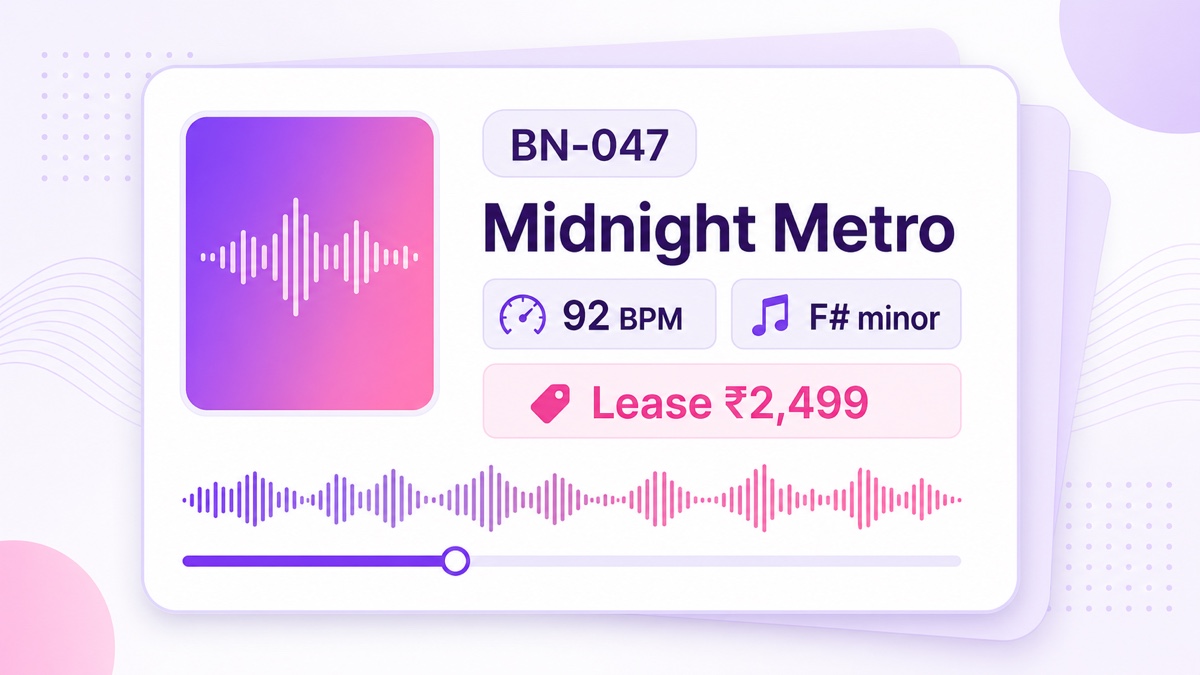
Each beat needs a unique ID, such as BN-047, that stays consistent across the video overlay, store listing, spreadsheet, and chat replies. Show the beat name, BPM, key, and licence status on screen. If prices vary by licence, write “Leases from ₹…” only when that amount is currently available; otherwise use “View licence options.”
Add an audible producer tag, but use it deliberately. A tag helps listeners remember the source and discourages casual ripping; it is attribution and a practical deterrent, not legal copy protection. Place it often enough to survive a short screen recording without ruining the listening experience.
A practical launch sequence
- Export each beat as a consistent video or audio-visual segment with its metadata overlay.
- Arrange 20–40 segments into a rotation and watch the complete sequence once, including the final-to-first transition.
- In YouTube Studio, go to Create → Go live → Stream, create the broadcast, and add an accurate title, description, thumbnail, visibility, and stream key.
- Upload the rotation to StreamNeo, connect the stream key, and start with an unlisted test.
- Check audio on phone speakers, headphones, and a second network. Then switch to the planned public broadcast.
With a cloud workflow, the radio keeps running while your computer is off and you are making the next batch. StreamNeo lets you upload the rotation and refresh it from the dashboard instead of leaving a DAW machine or OBS session running in the studio.
Make the exclusive-sale audit non-negotiable
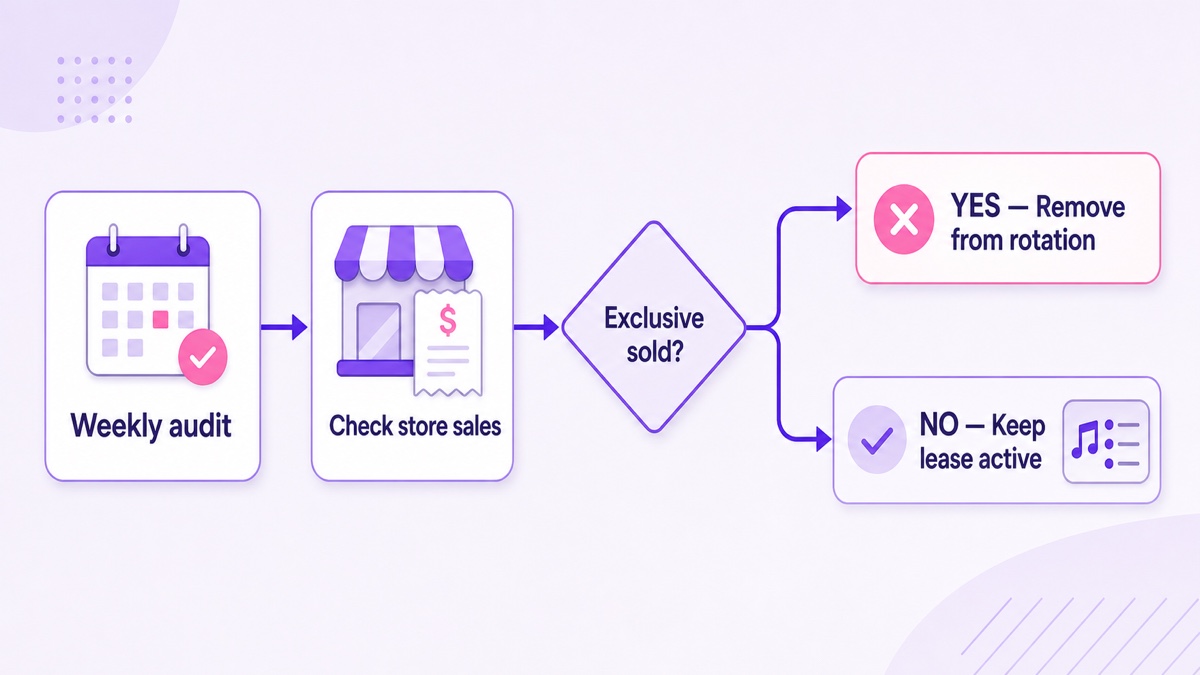
An exclusive sale changes the catalog. As a safe operating rule, remove the sold beat from the radio as soon as the transaction is confirmed. Your contract controls the exact rights, but continuing to promote or publicly stream a beat after granting exclusive rights can conflict with the buyer’s expectations or the licence itself.
Non-exclusive leases are different: the beat normally remains available under the terms you offered, while earlier licensees keep the rights their agreements granted. Never improvise this after a sale. Write the treatment of prior leases, promotional streams, and future listings into your licence terms, and get professional legal advice for high-value agreements.
Name the routine so it actually happens: the Friday Rotation Audit. Once a week, compare the live playlist against completed store orders, direct invoices, and pending exclusives. Remove sold exclusives, correct changed pricing, mark reserved beats, and add replacements. Also run the audit immediately after any exclusive sale rather than waiting for Friday.
Keep one sheet with these columns: beat ID, beat name, store URL, rotation position, lease status, exclusive status, sample proof, last audit date, and action owner. A simple source of truth prevents a collaborator from re-adding a beat that was removed last month.
Use type-beat language as a test, not a promise
“Type beat” phrases describe a sound in language buyers already use. They can help a relevant stream match a relevant query, but placing an artist’s name in the title does not guarantee ranking. YouTube says search considers relevance, engagement, and quality, including how the title, description, tags, and content match a query. Its own guidance also recommends accurate, concise titles.
Use that convention honestly. A title such as “Melodic trap type beats — 24/7 beat radio” sets an expectation the full rotation can meet. Stuffing five unrelated artist names into one title makes the promise weaker and the channel less memorable. Avoid implying endorsement, affiliation, or an official artist connection.
Balance search language with producer identity. Put the clearest sound phrase near the beginning and your station or producer name near the end. Inside the stream, label blocks by useful traits such as “melodic trap, 90–100 BPM” rather than forcing every beat under one celebrity comparison.
Run controlled tests. Keep the rotation and thumbnail stable, use one accurate searchable title for at least a comparable period, then test a brand-led title. In YouTube Studio, open Analytics → Content → Live and compare traffic sources, YouTube search terms, impressions, click-through rate, average view duration, and returning-viewer patterns. Record the dates; do not claim a title “works” from one busy evening.
Connect every beat to the store
A generic homepage link makes the buyer search twice. Put a short catalog index near the top of the description: beat ID, beat name, and direct product URL. Repeat the main store link in a pinned chat message, and use a readable on-screen QR code that opens the mobile store.
| Where | What to show | Purpose |
|---|---|---|
| Video overlay | BN-047, name, BPM, key | Identifies the playing beat |
| Description | Beat ID plus direct product link | Reduces purchase friction |
| Pinned chat | Store link and how to quote an ID | Helps mobile viewers act |
| Store page | Matching ID, preview, and licence terms | Confirms the exact product |
Test the path on a phone while logged out. Scan the QR code, tap the description link, and search the store using only the ID visible on screen. If BN-047 does not return the correct beat immediately, fix the catalog before buying more traffic.
Keep monetization expectations separate from beat sales. Ads, memberships, and other YouTube features have their own eligibility and policy rules; a stream can still be a useful storefront without them. The guide to monetizing 24/7 looped streams covers that distinction in detail.
Use chat as lightweight A&R
Chat reveals buyer language in real time. Questions such as “Which beat is this?”, “Do you have this without the hook?”, or “Can I get stems?” show where the overlay, licence menu, or catalog is unclear. Save repeated questions and use them to improve the next rotation.
Be present during studio hours rather than pretending to staff chat around the clock. Pin a message that explains the beat-ID system and response window. A useful version is: “Quote the BN number for licence or stems questions. I reply here during studio hours; store links are in the description.”
YouTube does not provide a neat per-beat “skip report” for one continuous broadcast. To learn which blocks hold attention, keep a timestamped rotation log and compare it with concurrent-viewer and audience-retention patterns. Treat changes as clues, not proof: time of day, outside promotion, and returning listeners can all affect the graph. Combine the numbers with chat mentions, store clicks, favourites, and enquiries tagged by beat ID.
Refresh the rotation weekly. Add new beats, move a promising block into a different time slot, and retire weak material only after enough comparable observations. The goal is not a frozen playlist; it is a storefront that keeps teaching you what artists want while you continue producing.
Start free — 24-hour trial, no card. Put your first audited rotation online, then improve it from real listener behaviour.
FAQ
Can beats made with Splice samples go on the radio?
Generally, yes, when the samples were licensed through Splice and used within your original work in line with its terms. Splice says its downloaded sounds can be used commercially in new works, but the sounds are non-exclusive and cannot be redistributed as standalone samples. Save the certified licence or download evidence, and verify the current terms for every marketplace you use.
What happens when a beat sells?
If it sells exclusively, remove it from the radio and store as soon as the sale is confirmed, subject to the exact agreement. Non-exclusive leases can usually remain available, and earlier licensees retain whatever their contracts granted. Your written licence should explain all three cases before a buyer pays.
Do type-beat titles work for streams?
They can attract people searching for that sound, but they do not guarantee discovery. Use one accurate phrase that represents the rotation, avoid implied artist affiliation, and test it against a producer-brand title using Live analytics, search terms, and watch behaviour over comparable periods.