A 24/7 devotional stream does not need a television studio.It needs a rights-safe library, clear audio, a thoughtful daily sequence, and a reliable way to keep that sequence live.A singer with a phone and ten original recordings can build a better foundation than a channel with hundreds of copied tracks.
This India-first playbook takes you from that folder of recordings to an always-on YouTube stream.The goal is not to imitate a music label.It is to create a dependable devotional space that listeners can enter at any hour.
Why devotional runs 24/7 better than almost any niche
Devotional listening naturally happens across the day.Someone may join during morning puja, play bhajans on a commute, keep a soft stream running at a shop, or listen before sleep.Because each song is meaningful on its own, a viewer does not need to arrive at the beginning of a programme.
That makes the format well suited to a continuous loop.The stream can act like ambient darshan: familiar, calm, and available when the devotee needs it.A well-ordered library also gives the channel a recognisable rhythm without requiring a host to be present every minute.
India’s festival calendar gives you a useful editorial calendar.Navratri, Shravan, Ganesh Utsav and Diwali can each have a dedicated, rights-cleared loop prepared in advance.Do not simply rename the same stream for every festival; change the songs, thumbnail and description so the promise matches what viewers hear.
Evergreen availability is only half the work.Devotional audiences value trust, audio comfort and correct credits.If the recording sounds harsh, the title is confusing, or a familiar commercial track appears without permission, being live all day will not rescue the channel.
Rights & copyright: the make-or-break section
An old bhajan and a modern recording of that bhajan are not the same piece of intellectual property. The underlying composition or traditional lyrics may be old, but a particular singer’s performance, arrangement and sound recording can still be protected.A CD, YouTube upload or streaming-service track does not become reusable just because the prayer itself is traditional.
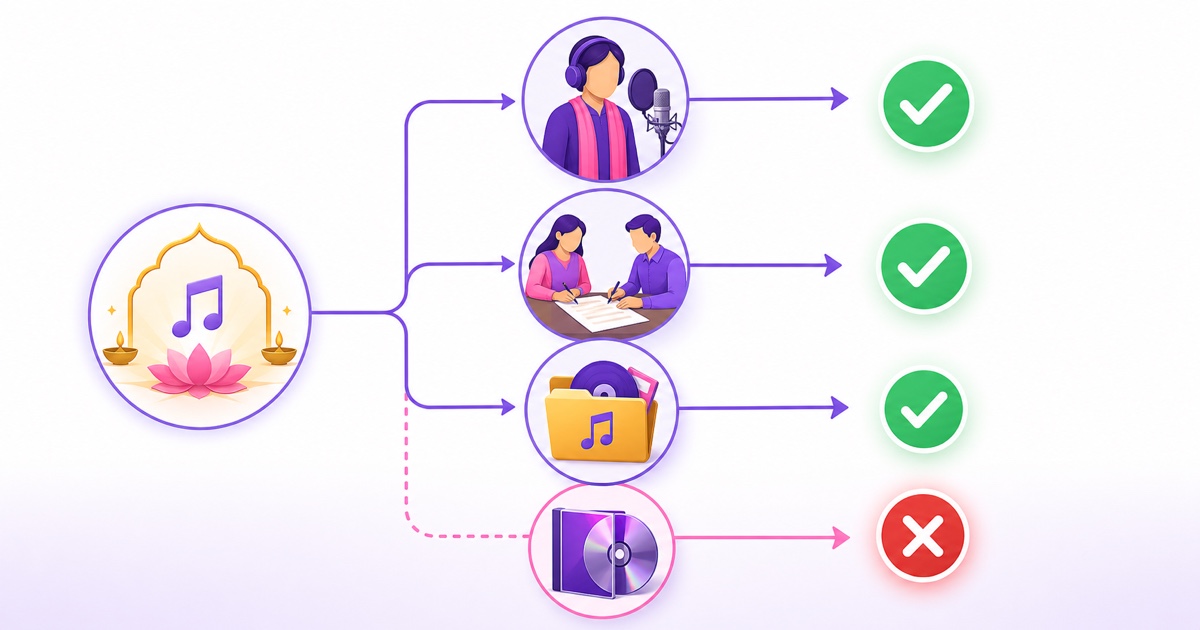
Commercial recordings from labels such as T-Series, Shemaroo Bhakti and other publishers should be treated as protected.Do not download them, combine them into a loop and assume that artist credit makes the use legal.Credits are respectful, but they do not replace permission or a licence.
Build the channel from one of three safe sources:
- Your own performances: you recorded the singer and musicians, and everyone involved agreed to the livestream use.
- Written permission: the singer, producer or label authorised you to use the specific recording.
- An explicitly licensed catalogue: the licence clearly permits YouTube livestreaming, continuous looping and your intended monetisation.
For written permission, identify the exact tracks and ask whether the permission covers continuous livestreaming, YouTube monetisation, all intended territories and the full period you plan to use them.Also ask who controls Content ID and whether your channel can be allowlisted.Keep licences, invoices, emails and recording-session consent in one folder.
A Content ID claim and a copyright strike are not identical, but neither should be ignored.If you own or licensed the recording, use your documents in the platform’s dispute process; do not submit a dispute based only on “this is a devotional song.” For a fuller risk explanation, read the guide to copyright strikes on 24/7 loops.
Record your own bhajans simply
Start with the room, not the microphone.Choose the quietest room available, close windows, switch off a noisy fan when practical, and use curtains, mattresses or folded blankets to reduce hard echoes.Put the phone in airplane mode and record a short test before the full take.
A modern phone can capture a useful performance when it is placed steadily and close enough to the singer.A basic lavalier mic is convenient for voice-led bhajans; a USB mic can work when recording directly into a compatible phone or laptop.Avoid placing the microphone right beside the harmonium reeds or tabla, because one instrument can overwhelm the voice.
Authenticity matters more than glossy production here.A stable harmonium-and-voice take with a natural room sound is useful; a heavily processed vocal that becomes tiring after an hour is not.Monitor with headphones, leave headroom so loud phrases do not distort, and capture ten seconds of room tone for clean edits.
Batch-record 10–15 bhajans in a session while the room, mic placement and performer levels remain consistent.Keep a simple sheet with the bhajan title, singer, musicians, language, recording date, rights owner and edit status.Get written consent from accompanying musicians as well as the lead singer.
Edit out false starts and long setup gaps, then export every video with the same core settings: MP4 container, H.264 video, AAC audio, a consistent 30 fps frame rate, and one chosen resolution such as 1280×720 or 1920×1080.Consistency makes the later playlist transition much cleaner.
Structure the loop
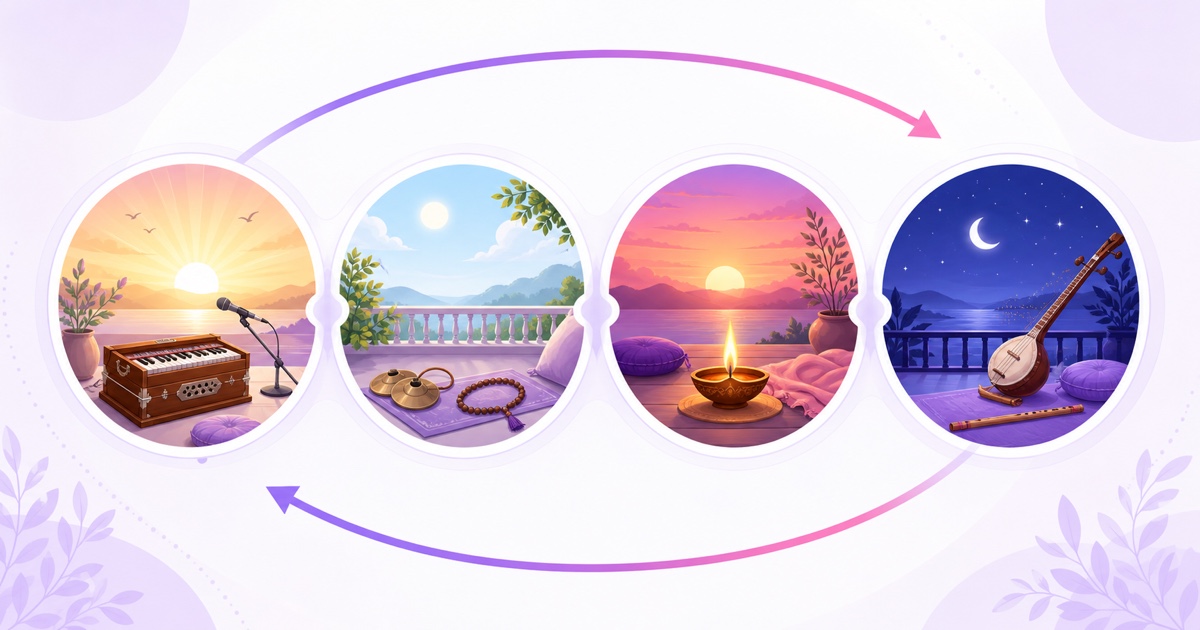
A useful starting loop is 60–120 minutes, long enough to avoid obvious repetition during a typical listening session.Build blocks around energy and time of day rather than placing files in random order.The same master library can support several seasonal arrangements without duplicating recordings.
| Daypart | Programming idea | Presentation |
|---|---|---|
| Morning | Uplifting invocations and familiar sing-along bhajans | Brighter visual, clear singer credit |
| Daytime | Balanced selection for home, commute or shop listening | Steady volume and minimal interruption |
| Evening | Calmer bhajans leading toward aarti time | Warm visual and pinned timing note |
| Late night | Soft voice-led or instrumental devotional pieces | Low-motion visual, no sudden loud openings |
Normalise perceived loudness across the set so listeners are not reaching for the volume button between tracks.Add short fades where needed, but do not cut off a mantra, aalap or final resonance merely to force an exact duration.
On screen, show the current bhajan name and singer credit in large, readable type.Keep it away from the lower and right edges where YouTube controls or mobile crops can obscure it.If you use a single long video, edit the full 60–120 minute programme before upload.If you prefer individual files, keep their export settings matched and follow this looping playlist guide.
A separate aarti-and-mantra format needs its own timing and repetition choices.Use the 24/7 aarti and mantra setup guide when the channel is centred on scheduled aarti or continuous jaap rather than a varied song library.
Titles and discovery, Hindi-first
Lead with the language your devotee reads.A practical title could be “सुबह के भजन LIVE | श्री राम भक्ति गीत | Bhajan Live 24x7”.Devanagari communicates the subject immediately, while a natural Hinglish phrase helps people who type searches such as “bhajan live” or “bhakti songs 24x7.”
Do not stack the title with every deity, festival and keyword.Name what is actually playing, the mood or daypart, and the live format.If the loop is a recorded performance, say so plainly in the description and list the singers, musicians and rights owner.
The first lines of the description should answer three questions: what the viewer will hear, who performed it, and when special segments occur.After that, add the track list, rights statement and a few natural search phrases.Avoid copying the same keyword dozens of times.
Design for elders as well as younger viewers.Use one strong image, large Devanagari type, high contrast and very few words on the thumbnail.Check it at phone size before publishing.A beautiful title that cannot be read in WhatsApp preview size is not doing its job.
Go live from a phone
You can prepare and control this setup from a phone without leaving that phone encoding video all day.First enable livestreaming on the YouTube channel.In a phone browser, open YouTube Studio in desktop view if necessary, then use YouTube Studio → Create → Go live → Stream.Create the stream, set its title, description, audience and visibility, then copy the stream URL and stream key.
Treat the stream key like a password.Do not paste it into chat groups, screenshots or shared notes.Anyone with that key may be able to broadcast to the channel; reset it in YouTube Studio if it is exposed.
For a cloud workflow, register with StreamNeo, upload the prepared MP4 or matched playlist, add the YouTube stream details, and start with an unlisted test.Listen on another phone for several track changes, confirm that the picture and audio stay in sync, and check that all credits are visible.The longer mobile walkthrough is in the phone-only 24/7 stream guide.
Once the test is clean, switch to the intended public stream and watch YouTube Studio for warnings.Because the cloud sends the files to YouTube, your phone does not need to remain powered on as the encoder.StreamNeo offers a 24-hour free trial with no card; short festival usage can be priced at ₹49/day, while the always-on plan is ₹999/month.Check the current options on the pricing page.
Community and festival growth
Make the stream feel attended even when the playlist is automated.Pin a chat message with the morning and evening aarti times, name the current festival programme, and state who owns the recordings.Ask one or two trusted moderators to remove spam and fake donation links.
Plan seasonal loops several weeks before Navratri, Shravan, Ganesh Utsav and Diwali.Record the missing songs, obtain permissions, prepare a festival thumbnail, and test the new sequence as unlisted.Swap the loop when the season begins, then return to the evergreen library when it ends.
Use comments and live chat as programming feedback, not as a command to chase every trend.If listeners repeatedly request a bhajan you do not own, record your own version after checking the composition and arrangement rights or secure a proper licence.Never solve a request by pulling someone else’s recording from YouTube.
A Facebook Page simulcast can reach family audiences who discover devotional content through WhatsApp forwards and Page shares.Keep the title and schedule consistent across platforms, and follow the YouTube and Facebook simulcast setup rather than running two improvised phone encoders.
The durable advantage is a catalogue you can prove you have the right to use.Add new original performances regularly, keep the daily structure predictable, and use festival specials as genuine programming moments.When the library is ready, start free with a 24-hour trial—no card required.
More from the journal: The Indian Festival Calendar for 24/7 Channels: Planning a Year of Loops · FAST Channels Explained for Creators: Linear TV Without a Broadcaster · Ad Revenue on a Regional-Language 24/7 Channel in India
FAQ
Can I stream famous T-Series bhajans?
Not without permission or a licence for the specific recording.A traditional bhajan may be old, but the label’s sound recording and a modern arrangement can still be protected.Record your own performance with the necessary participant permissions, or license a catalogue that explicitly allows continuous YouTube livestreaming.
What is the best time to start the loop?
Start before your audience’s morning puja window so the stream is already available when listeners arrive.Then use daypart blocks to carry it through daytime, evening and night.Test the public schedule against your own audience location instead of assuming one time fits all of India.
Should I use Hindi or English titles?
Use Devanagari first when that is what your core audience reads, then add one or two natural Hinglish search phrases in the title or description.Keep the thumbnail large and simple.Clarity for the devotee matters more than packing in English keywords.