
A horror channel does not need a camera crew, a dramatic set, or a new performance every night. It needs stories you are allowed to use, narration that remains comfortable at low volume, and a programme long enough to feel like a station rather than one clip on repeat.
This playbook shows how to build a 24/7 scary stories live stream without scraping forum posts or startling the people who use it as bedtime audio. The practical target is a calm 90–150-minute block that can be refreshed regularly and joined at any point.
Why horror works as always-on audio
Horror narration is naturally mid-join friendly. A listener can arrive during a story, stay for the next one, lock the phone, and keep listening without watching every frame. That behaviour suits an always-on stream far better than a tightly plotted video that only makes sense from minute zero.
The night audience is not one audience, though. Some people want company while working late. Some want a campfire-radio mood. Many search for scary stories to sleep to and need the opposite of a jump scare: predictable pacing, steady volume, and an atmosphere that never suddenly attacks their headphones.
Design for that last listener. Put a short spoken introduction at the beginning of each story, not a loud sting. Keep segment transitions gentle. Avoid screaming thumbnails and titles if the actual programme is subdued. A promise such as “Rainy village horror stories — calm narration — live” sets a clearer expectation than “Most terrifying stories ever.”
A related sleep-sounds playbook is useful for thinking about long-session audio, but narration needs more active rights management and tighter control of speech levels.
Rights and copyright decide whether the channel lasts
A story being visible on a forum, subreddit, blog, or community page does not make it free material. The author normally owns the original writing. Crediting a username is courteous, but credit is not permission and does not prevent a copyright complaint.
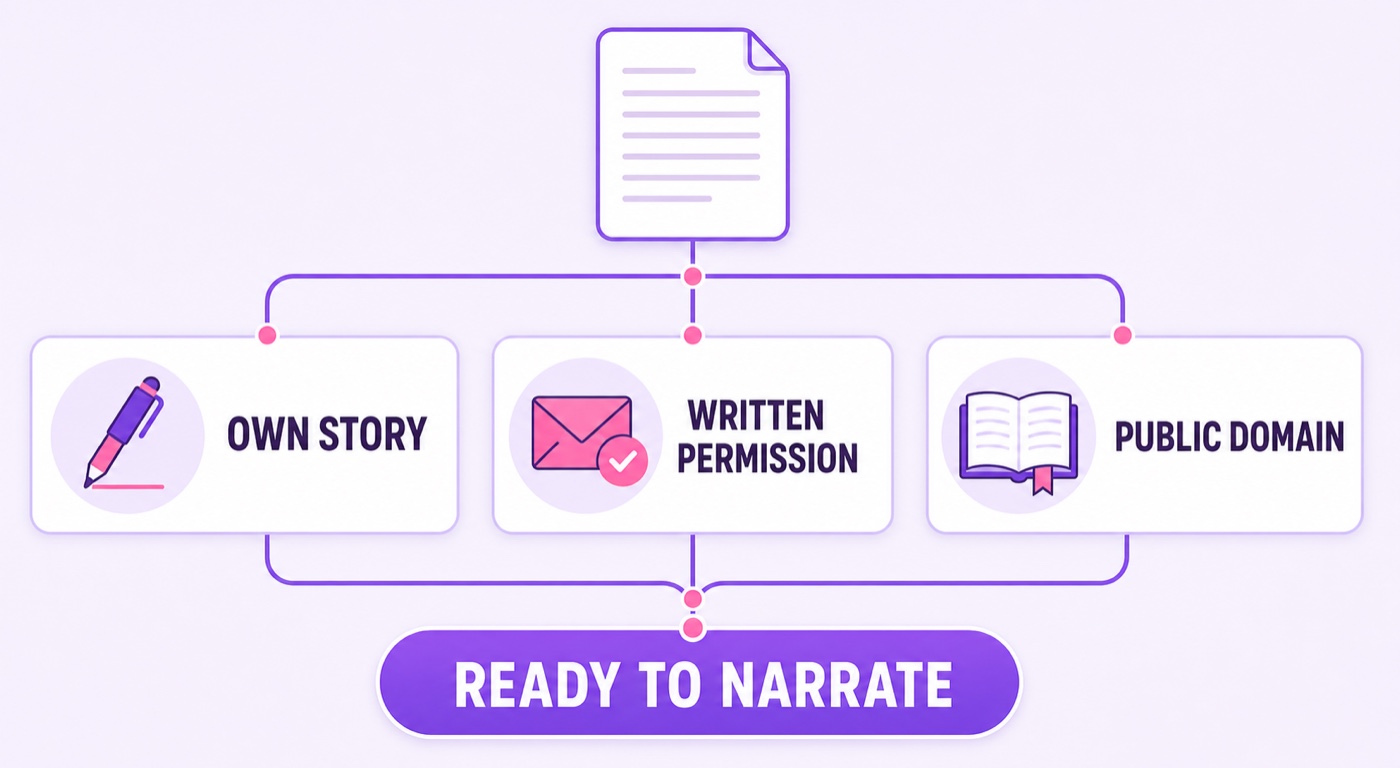
Use one of three clean sources:
- Your own stories: keep dated drafts and source files. If a co-writer contributed, agree in writing who may narrate, edit, translate, monetise, and livestream the work.
- Written permission: ask the author for permission that explicitly covers narration, adaptation where needed, monetised YouTube use, and repeated live streaming. Save the reply and the story URL in your production folder.
- Public-domain material: verify the status of the specific text in the territories relevant to you. An old original may be public domain while a modern translation, annotated edition, audiobook performance, cover, or illustration remains protected.
When asking permission, be concrete: name your channel, link the exact story, explain that the recording will repeat in a continuous livestream, say whether ads may run, and describe the credit. “May I use this?” is too vague for a format the author may not understand.
Older English-language classics can be useful, but do not treat an author’s age as a complete rights check. Confirm the edition and source text, then record your own performance. Folk tales also need care: a traditional plot may be old, while a recent writer’s wording or translation is not.
Every layer has separate rights. Your script permission does not license a rain track, cinematic music, stock illustration, font, or another narrator’s recording. Keep a small rights ledger with the asset name, creator, source URL, licence, proof file, allowed platforms, attribution text, and expiry date. If any row is blank, do not put that asset into the block. For a fuller distinction between claims and strikes, read the 24/7 loop copyright guide.
Synthetic voices need terms checks and honest disclosure
An AI voice does not repair an unlicensed script. First clear the story; then check the voice tool’s current commercial-use terms for your plan, the generated output, voice cloning, and livestream distribution. Save a dated copy or screenshot of the terms that applied when you generated the audio, because products and plans change.
Do not clone a narrator, actor, celebrity, or author without clear authority. YouTube’s current altered or synthetic content guidance requires disclosure when content is meaningfully altered or generated and appears realistic. Its examples specifically distinguish ordinary production assistance and cloning your own voice from cloning someone else’s voice or making a real person appear to say something they did not.
If your audio meets that rule, use the upload details path in YouTube Studio and set Altered content → Yes. A generic fictional narrator is not a licence to impersonate a real person, and a line in the description does not replace the Studio setting when the disclosure is required.
Quality still matters more than novelty. Run the final script through a human pass for names, breath points, emphasis, and pronunciation. “Bhairavgarh,” “Chandni Chowk,” or a regional surname said incorrectly can collapse the setting in one sentence. Generate or record a short test, listen on a phone speaker, and fix the pronunciation dictionary before rendering the whole block. The same terms-and-disclosure discipline applies to synthetic soundtracks; see the AI-generated music channel guide.
Record narration that works at low volume
Start with the quietest room available, switch off fans or appliances briefly if practical, and place the microphone close enough that you do not need aggressive noise reduction. A soft room with curtains and bedding usually beats a bare room with an expensive microphone. Record at a consistent distance, slightly off-axis from the mouth, with peaks safely below clipping.
Read slower than conversational speech but not so slowly that every line sounds theatrical. Leave a natural pause at scene changes. Control plosives and mouth noise at recording time; heavy processing can make whispered narration brittle and tiring.
The crucial step is matching stories to one another. Measure integrated loudness with the same meter for every finished file, choose one target that suits your workflow, and normalise all segments to it. The exact number matters less than consistency and clean headroom. Listen through every transition on headphones at a low setting: if story four suddenly feels closer or the ambience jumps forward, fix it before export.
Use gentle compression to contain peaks, a limiter only as a safety ceiling, and no loud impact between stories. Keep the ambience well below speech. Test the quietest lines on a budget phone speaker and the loudest moments on headphones. Both should remain understandable without forcing a volume change.
Build a visual layer that does not demand attention
The screen should confirm mood and identity without becoming the main event. Good options include rain moving slowly across a window, one candle, a dim corridor illustration with subtle grain, or a restrained parallax loop. Dark plum and muted violet hold up better in a dark room than frequent white flashes.
Add a short burned-in title card at each story boundary with the story title and author credit. It helps someone who wakes up halfway through identify the segment, and it gives moderators a precise reference when a listener asks about a story. The burned-in overlay guide explains how to make identifiers part of the video rather than depending on a live graphics layer.
Avoid scraped cover art, horror-film stills, and random images from search results. Create your own visual, commission it, or use an asset whose licence clearly covers commercial livestream use. Keep proof in the same ledger as the scripts and audio.
Assemble a 90–150-minute block
A useful first programme contains six to ten stories totalling 90–150 minutes. That is long enough to avoid an obviously short repeat while remaining manageable to edit and refresh. Mix lengths so the rhythm varies: for example, two 10-minute pieces, three around 15 minutes, and one longer closing story.
- Export every narration segment to the same sample rate and channel layout.
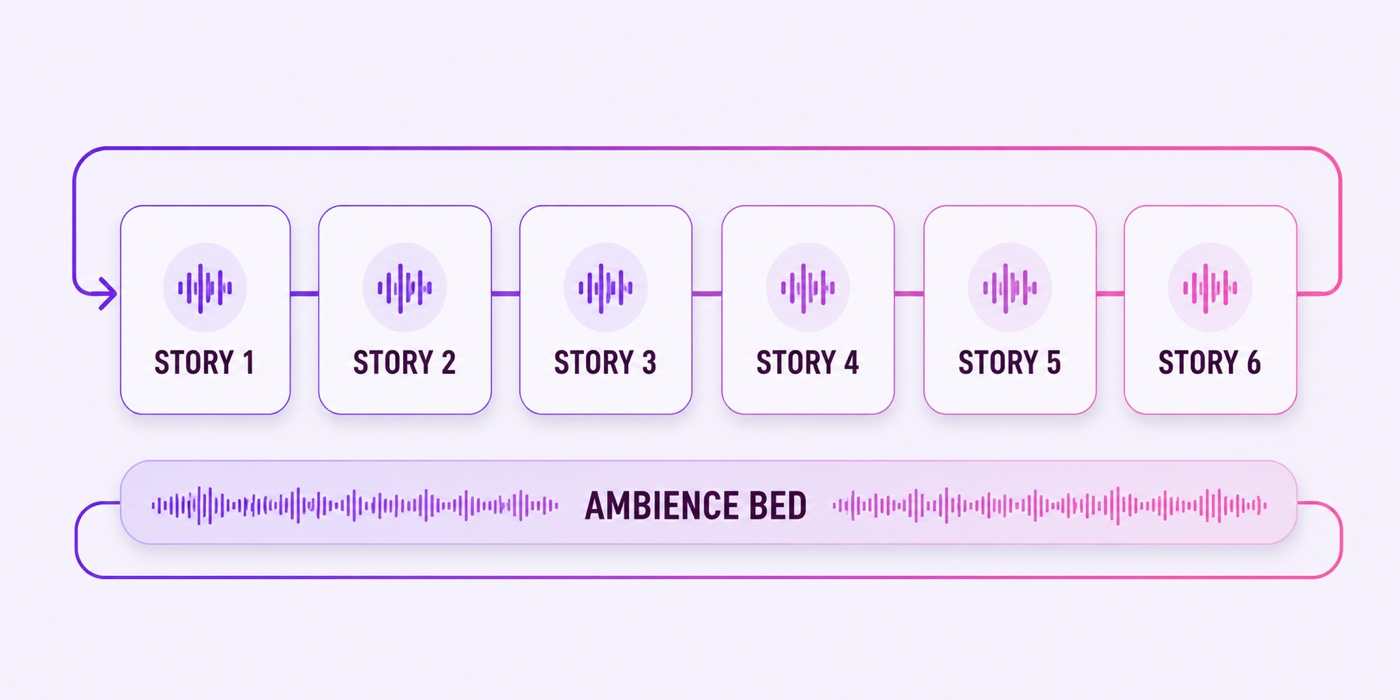
- Place one licensed ambience bed under the complete timeline at a fixed level.
- Add a few seconds of breathing space between stories; do not drop into dead digital silence.
- Insert the spoken introduction and matching title card at each boundary.
- Watch and listen across every join, including the final-to-first loop point.
- Export one master video and test the entire file privately before going live.
In the description, publish a tracklist with timestamps, titles, authors, credit wording, and a concise permission note such as “narrated with written permission.” Do not expose private emails; retain those off-platform. Label the broadcast honestly as a continuous programme of recorded narration rather than implying that a person is reading live at 3 a.m.
Once the block passes the test, upload it to StreamNeo and the night shift runs itself. The diagram below is the whole operating idea: individual story cards over one controlled ambience bed, then a clean return to the start.
India-specific opportunity: tell local stories locally
Hindi horror stories, bhoot ki kahaniyan, and regional-language narration have room for voices that sound rooted in a place rather than translated from Western creepypasta. A night bus in Himachal, a closed textile mill in Gujarat, or monsoon footsteps outside a Kolkata flat can feel specific without turning a community or belief into a prop.
Use the language you actually speak well. Preserve the tone of village folklore, credit the teller or source where appropriate, and get permission for a modern retelling. A bilingual title can help discovery, but the narration should not switch languages randomly unless that is an intentional part of the performance.
Grow the library without promising growth
Package the channel around atmosphere: calm narration, rain, regional folklore, or classic ghost fiction. Keep title and thumbnail promises accurate. Review audience retention and chat patterns to learn which story lengths and voices people choose, but do not infer that an always-on label guarantees viewers, subscribers, or monetisation.
Refresh the block monthly with at least one genuinely new story and retire weak or rights-uncertain segments. Keep the previous master and rights ledger so a bad update can be rolled back quickly. Original narration and a clear creative contribution also matter for monetisation review; permission alone does not make minimally changed third-party material original.
An unattended overnight chat needs boundaries before promotion. In YouTube Live Control Room, open the stream, choose Edit → Live chat, and consider subscribers-only participation. Under Edit → Customization, set slow mode. YouTube Studio also supports blocked words and Basic or Strict moderation, and you can appoint trusted moderators. If nobody can watch the room, disabling chat is safer than waking to hours of abuse or spam. Use the full always-on chat moderation checklist before launch.
The sustainable routine is small: glance at stream health daily, review held chat, check rights before every addition, listen to the new loop boundary, and schedule one meaningful monthly refresh. That is a radio operation, not a lottery ticket.
FAQ
Can I narrate stories I found on a horror forum?
Only with the author’s permission unless the specific work is demonstrably in the public domain. A public post is not a reuse licence, and credit alone is not permission. Ask in writing for narration, monetisation, and repeated livestream rights, then save the approval.
Are AI-narrated horror channels allowed?
AI narration is not automatically prohibited, but you must hold rights to the script and comply with the voice tool’s current commercial terms. YouTube’s altered or synthetic content disclosure may apply to realistic material, especially cloned voices or audio that makes a real person appear to speak. Use the Studio disclosure setting when required.
How long should the loop be?
A practical first block is 90–150 minutes with six to ten stories matched in loudness. Add gentle gaps, keep the ambience level stable, and test the final-to-first transition so the repeat does not wake a listener.
Start free — 24-hour trial, no card. If you want to compare plans first, see StreamNeo pricing.